
AZ-104 · Question #622
Hotspot Question You have an Azure subscription that contains a resource group named RG1. You plan to use an Azure Resource Manager (ARM) template named template1 to deploy resources. The solution…
The correct answer is params.json: -ResourceGroupName; RG1 -Mode: Complete. This question tests knowledge of ARM template deployment commands and deployment modes, specifically how to use 'Complete' mode to remove existing resources before deploying new ones.
Question
Exhibit
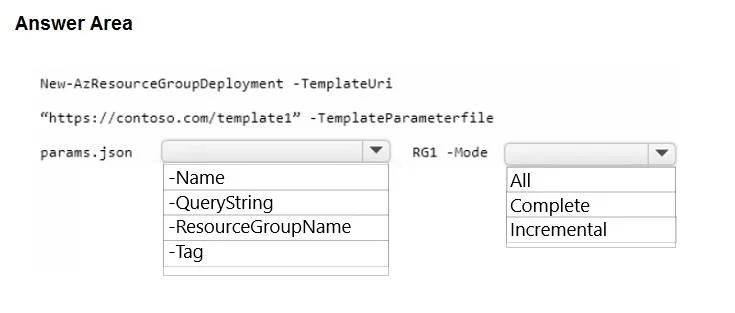
Answer Area
- params.json-ResourceGroupName-Name-QueryString-ResourceGroupName-Tag
- RG1 -ModeCompleteAllCompleteIncremental
Explanation
This question tests knowledge of ARM template deployment commands and deployment modes, specifically how to use 'Complete' mode to remove existing resources before deploying new ones.
Approach. The correct command uses 'New-AzResourceGroupDeployment' (PowerShell) or 'az deployment group create' (Azure CLI) with the '-Mode Complete' parameter. The 'Complete' deployment mode tells Azure Resource Manager to delete resources that exist in the resource group but are NOT defined in the template, effectively clearing out old resources before deploying new ones. The command would look like: New-AzResourceGroupDeployment -ResourceGroupName RG1 -TemplateFile template1.json -Mode Complete. The key selections are: (1) 'New-AzResourceGroupDeployment' as the cmdlet to deploy to a resource group, and (2) 'Complete' as the Mode parameter value, since 'Incremental' mode (the default) would only add/update resources without removing existing ones.
Concept tested. ARM template deployment modes (Incremental vs Complete) and the correct PowerShell/CLI cmdlet for resource group-scoped deployments. The 'Complete' mode is critical here because it ensures existing resources not in the template are deleted, while 'Incremental' mode would leave existing resources intact.
Reference. https://learn.microsoft.com/en-us/azure/azure-resource-manager/templates/deployment-modes
Topics
Community Discussion
No community discussion yet for this question.