
AZ-104 · Question #595
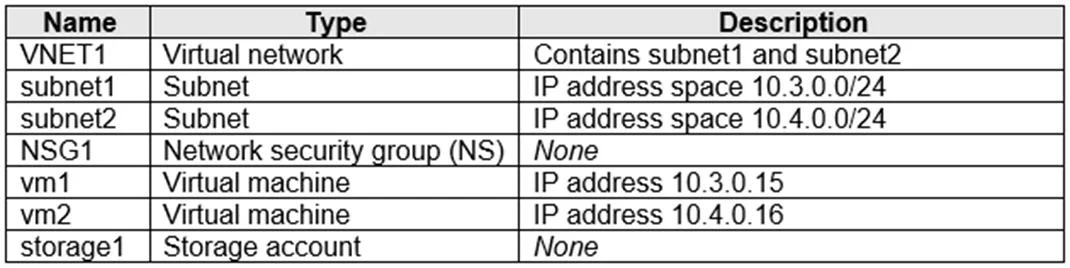
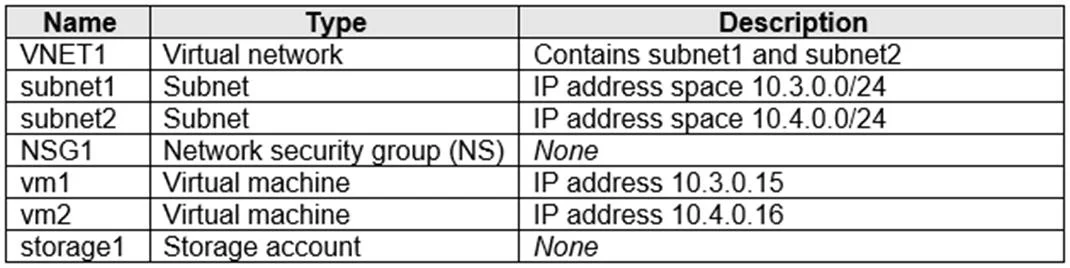
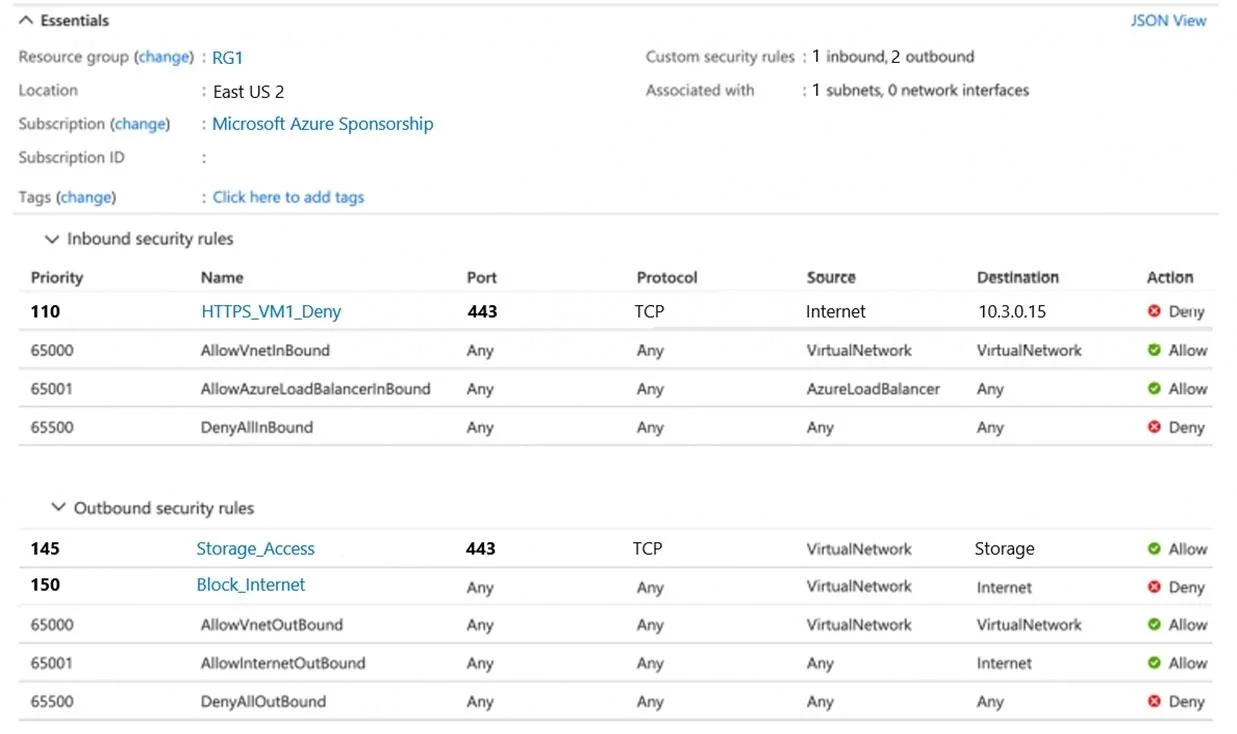
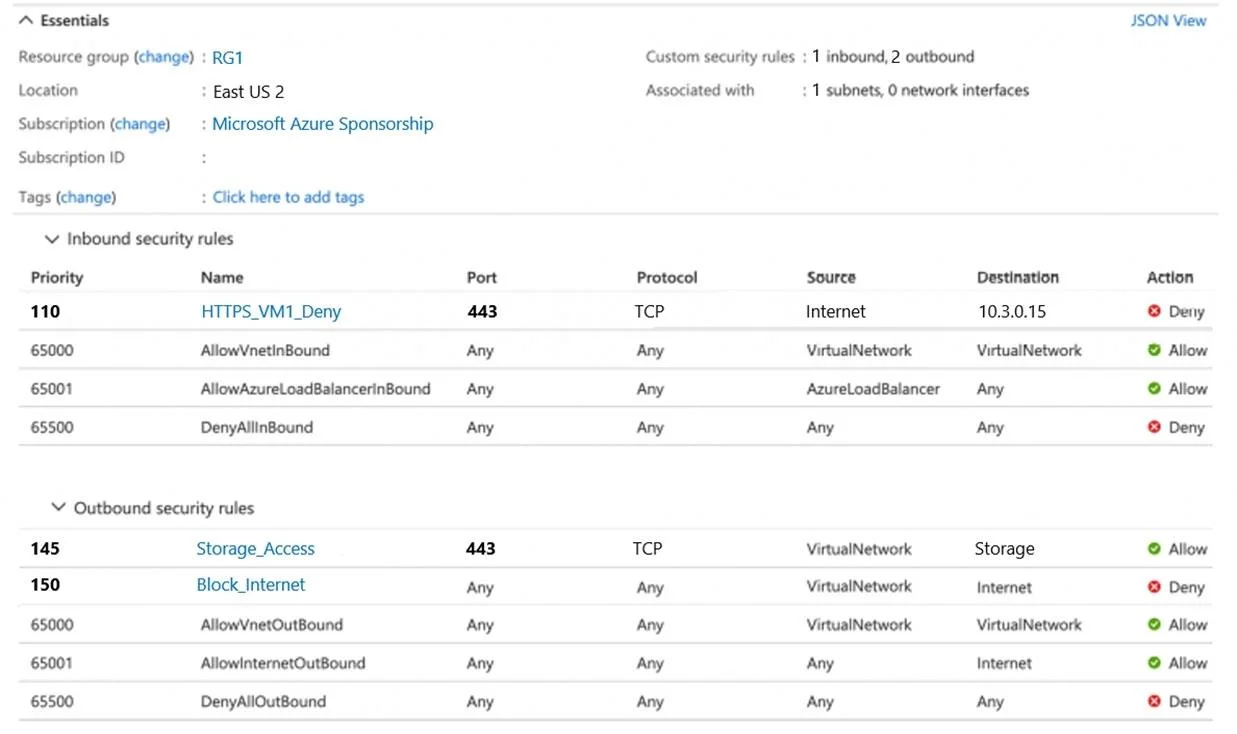
Hotspot Question You have an Azure subscription that contains the resources shown in the following table. NSG1 is configured as shown in the following exhibit. For each of the following statements…
The correct answer is Users that are assigned Role1 can assign Role1 to users. = No; Users that are assigned Role1 can deploy new virtual machines. = Yes; Users that are assigned Role1 can set a static IP address on a virtual machine. = Yes; VM1 can access storage1. = Yes; VM2 can access VM1 by using the HTTPS protocol. = Yes; The security rules for NSG1 apply to any virtual machine on VNET1. = No. Azure Hotspot Question - Detailed Explanation --- Statement 1: Users assigned Role1 can assign Role1 to others -> No Why: Assigning roles in Azure RBAC requires the Microsoft.Authorization/roleAssignments/write permission. This is only included in Owner or User Access…
Question
Exhibits
Answer Area
- Users that are assigned Role1 can assign Role1 to users.No
- Users that are assigned Role1 can deploy new virtual machines.Yes
- Users that are assigned Role1 can set a static IP address on a virtual machine.Yes
- VM1 can access storage1.Yes
- VM2 can access VM1 by using the HTTPS protocol.Yes
- The security rules for NSG1 apply to any virtual machine on VNET1.No
Explanation
Azure Hotspot Question - Detailed Explanation
Statement 1: Users assigned Role1 can assign Role1 to others -> No
Why: Assigning roles in Azure RBAC requires the Microsoft.Authorization/roleAssignments/write permission. This is only included in Owner or User Access Administrator built-in roles. Role1 (likely Virtual Machine Contributor based on the other statements) scopes its permissions to VM operations only and deliberately excludes authorization management.
Memory tip: "Only Owners own the keys to the kingdom (role assignment)."
Statement 2: Users assigned Role1 can deploy new VMs -> Yes
Why: Role1 (Virtual Machine Contributor) explicitly includes Microsoft.Compute/virtualMachines/write, which covers creating and deploying virtual machines within the assigned scope (resource group/subscription).
Statement 3: Users assigned Role1 can set a static IP on a VM -> Yes
Why: Setting a static IP requires writing to the Network Interface (NIC) resource. Virtual Machine Contributor includes Microsoft.Network/networkInterfaces/*, covering NIC configuration including IP address assignment (dynamic -> static).
Statement 4: VM1 can access storage1 -> Yes
Why: This is enabled through one of:
- Managed Identity on VM1 with a role assignment (e.g., Storage Blob Data Reader) on storage1, or
- A Service Endpoint on the VNet subnet allowing private routing to Azure Storage
The NSG rules and network configuration permit this traffic path.
Statement 5: VM2 can access VM1 via HTTPS -> Yes
Why: NSG1 contains an inbound security rule allowing TCP port 443 (HTTPS) from VM2's IP/subnet to VM1. NSG rules are stateful - if inbound is allowed, return traffic is automatically permitted without a separate outbound rule.
Statement 6: NSG1 rules apply to any VM on VNET1 -> No
Why: This is the most commonly misunderstood Azure networking concept.
NSGs are associated at two levels only:
| Level | Scope |
|---|---|
| Subnet | All VMs in that one subnet |
| NIC | Only that one VM's interface |
NSGs are never associated at the VNet level. If NSG1 is associated with only one subnet (e.g., subnet1) or one NIC within VNET1, it does not apply to VMs in other subnets of VNET1.
Memory tip: "NSG = Not Subnet Global. It guards a door, not the whole building."
Quick Summary Table
| # | Statement | Answer | Key Concept |
|---|---|---|---|
| 1 | Can assign roles | No | roleAssignments/write needed (Owner/UAA only) |
| 2 | Can deploy VMs | Yes | VM Contributor has Compute/write |
| 3 | Can set static IP | Yes | VM Contributor includes Network/NIC/* |
| 4 | VM1 -> storage1 | Yes | Managed Identity or Service Endpoint |
| 5 | VM2 -> VM1 HTTPS | Yes | NSG inbound rule allows port 443 |
| 6 | NSG1 applies to all VNET1 VMs | No | NSGs apply at subnet/NIC, never VNet |
Topics
Community Discussion
No community discussion yet for this question.