
AZ-104 · Question #381
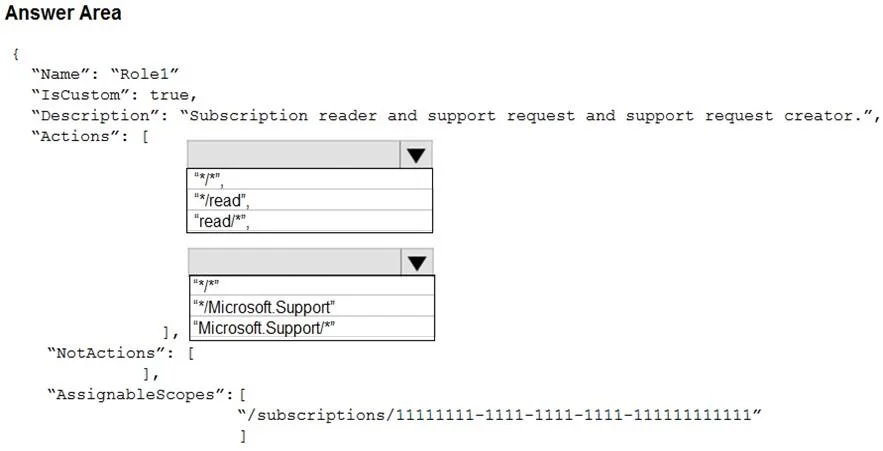
Hotspot Question You plan to create a new Azure Active Directory (Azure AD) role. You need to ensure that the new role can view all the resources in the Azure subscription and issue support requests…
The correct answer is Select action for viewing all resources: "*/read"; Select action for issuing support requests: "Microsoft.Support/*". To create a custom Azure role that allows viewing all resources and issuing support requests while adhering to the principle of least privilege, the correct actions are '//read' for universal read access and 'Microsoft.Support/*' for full support request management.
Question
Exhibit
Answer Area
- Select action for viewing all resources"*/read""*/*""*/read""read/*"
- Select action for issuing support requests"Microsoft.Support/*""*/*""*/Microsoft.Support""Microsoft.Support/*"
Explanation
To create a custom Azure role that allows viewing all resources and issuing support requests while adhering to the principle of least privilege, the correct actions are '//read' for universal read access and 'Microsoft.Support/*' for full support request management.
Approach. The scenario requires the role to 'view all the resources in the Azure subscription' and 'issue support requests to Microsoft', while adhering to the 'principle of least privilege'.
-
For 'view all the resources in the Azure subscription': This implies read-only access across all resource types and providers. The option
"*/*/read"is the most appropriate action for this requirement. The first*represents all resource providers, the second*represents all resource types within those providers, andreadspecifies the action. This grants read access broadly without granting unnecessary write or delete permissions, upholding the principle of least privilege. -
For 'issue support requests to Microsoft': This functionality falls under the
Microsoft.Supportresource provider. To allow issuing support requests (which involves creating, updating, and viewing support tickets), comprehensive access to this specific resource provider is needed. The option"Microsoft.Support/*"grants all actions within theMicrosoft.Supportresource provider, which includes the necessary permissions to create and manage support requests. This is specific to the support provider and does not grant broader permissions unnecessarily.
Therefore, the correct selections are "*/*/read" for the first hotspot and "Microsoft.Support/*" for the second hotspot.
Common mistakes.
- common_mistake. 1. Selecting
"*/*"for viewing resources: This grants all actions (read, write, delete) across all resource providers, which violates the principle of least privilege as only read access is required. It's a significant over-permission.
- Selecting
"read"for viewing resources: While 'read' is an action,"read"alone is often too specific or incomplete without preceding wildcards to apply it broadly across all resource types/providers."*/*/read"is the standard and correct way to grant universal read access in Azure RBAC. - Selecting
"*Microsoft.Support"or"Microsoft.Support"for support requests:"*Microsoft.Support"is not a valid action format."Microsoft.Support"refers to the resource provider name itself, not an action or a set of actions within that provider. To grant permissions within a resource provider, you typically need to specify actions or use the wildcard/*after the provider name (e.g.,Microsoft.Support/readorMicrosoft.Support/*). These options would fail to grant the necessary permissions for issuing support requests.
Concept tested. Custom Azure RBAC (Role-Based Access Control) role definition using JSON, understanding of Actions syntax and wildcards, application of the Principle of Least Privilege, and knowledge of specific Azure resource provider actions (e.g., Microsoft.Support).
Reference. https://docs.microsoft.com/en-us/azure/role-based-access-control/custom-roles
Topics
Community Discussion
No community discussion yet for this question.