
AZ-104 · Question #369
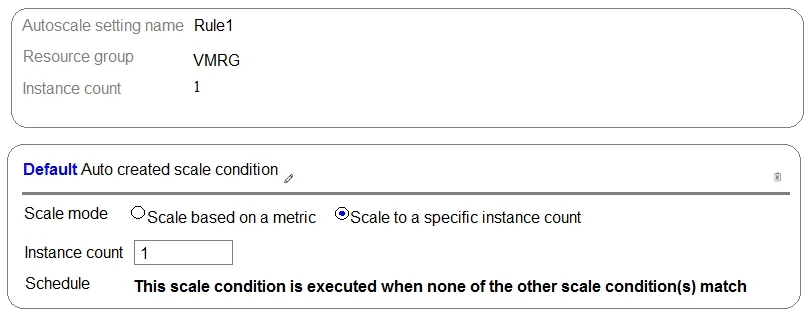
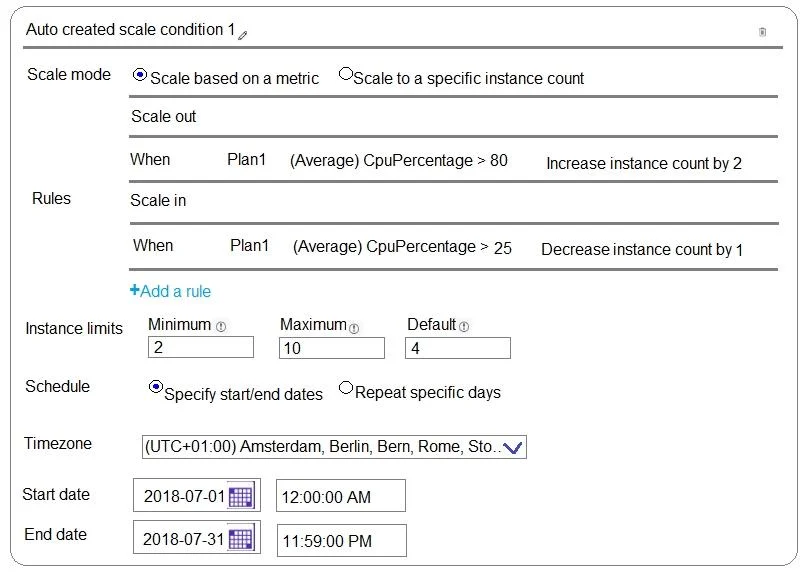
Hotspot Question You create an Azure web app named WebApp1. WebApp1 has the autoscale settings shown in the following exhibit. The scale out and scale in rules are configured to have a duration of…
The correct answer is Scale mode: Scale to a specific instance count. Azure Autoscale evaluates scheduled conditions first; if no schedule matches, the default condition applies, and metric-based scaling always respects defined minimum/maximum instance limits.
Question
Exhibits
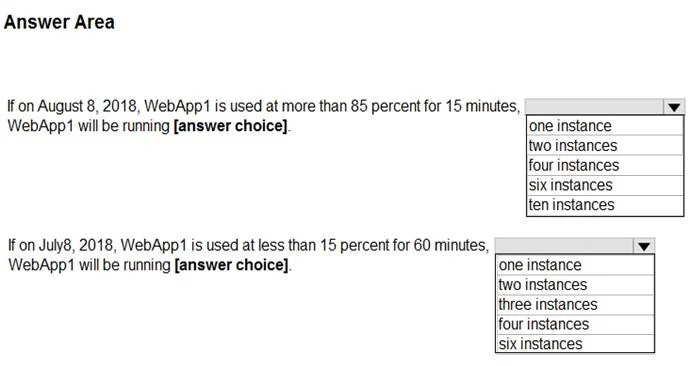
Answer Area
- Scale modeScale to a specific instance countScale based on a metricScale to a specific instance count
Explanation
Azure Autoscale evaluates scheduled conditions first; if no schedule matches, the default condition applies, and metric-based scaling always respects defined minimum/maximum instance limits.
Approach. For the first statement (August 8, 2018): This date falls outside the schedule for 'Condition 1' (which ends July 31). Therefore, the 'Default' condition applies, strictly fixing the instance count to 1 regardless of the high CPU usage. For the second statement (July 8, 2018): This date falls within the active schedule for 'Condition 1'. The low CPU usage (< 15%) triggers the scale-in rule to decrease instances. However, scaling in is hard-capped by the Minimum instance limit configured in the profile, which is 2. It will not drop below 2 instances.
Common mistakes.
- common_mistake. A common mistake is ignoring the date schedules and applying the CPU rules universally, which would incorrectly lead to choosing higher instances for August 8. For July 8, users might forget to check the 'Minimum' limit and incorrectly assume the instances could scale all the way down to 1 after 60 minutes of low usage.
Concept tested. Azure Monitor Autoscale profiles, schedule evaluation hierarchy, and instance limits (Min/Max/Default).
Reference. https://learn.microsoft.com/en-us/azure/azure-monitor/autoscale/autoscale-understanding-settings
Topics
Community Discussion
No community discussion yet for this question.