
AZ-104 · Question #30
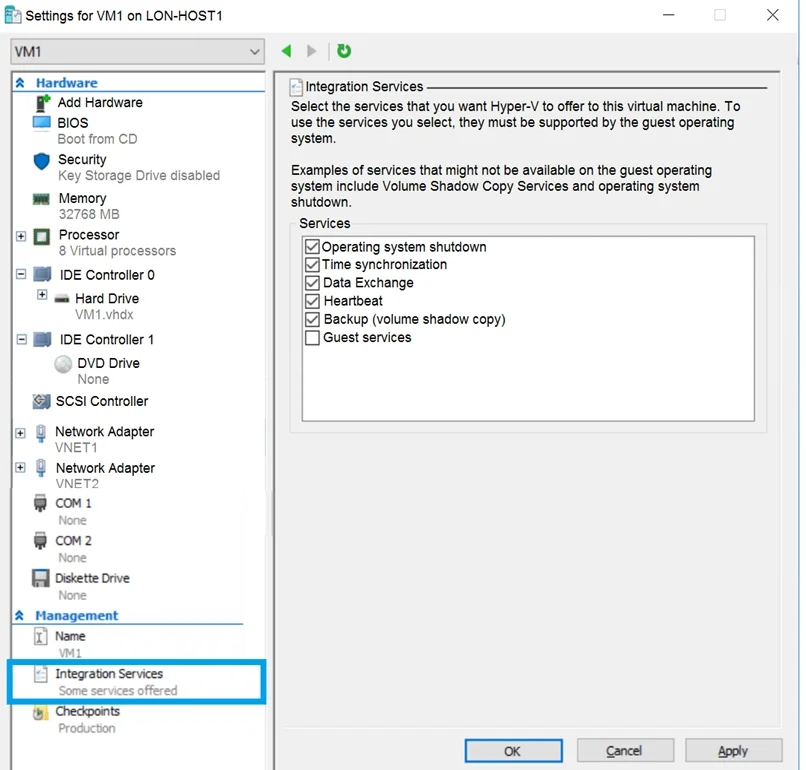
You have an Azure subscription. You have an on-premises virtual machine named VM1. The settings for VM1 are shown in the exhibit. You need to ensure that you can use the disks attached to VM1 as a…
The correct answer is C. the hard drive. From the exhibit we see that the disk is in the VHDX format. Before you upload a Windows virtual machine (VM) from on-premises to Microsoft Azure, you must prepare the virtual hard disk (VHD or VHDX). Azure supports only generation 1 VMs that are in the VHD file format and have…
Question
Exhibits
Options
- Athe memory
- Bthe network adapters
- Cthe hard drive
- Dthe processor
- EIntegration Services
How the community answered
(15 responses)- A13% (2)
- B7% (1)
- C73% (11)
- E7% (1)
Explanation
From the exhibit we see that the disk is in the VHDX format. Before you upload a Windows virtual machine (VM) from on-premises to Microsoft Azure, you must prepare the virtual hard disk (VHD or VHDX). Azure supports only generation 1 VMs that are in the VHD file format and have a fixed sized disk. The maximum size allowed for the VHD is 1,023 GB. You can convert a generation 1 VM from the VHDX file system to VHD and from a dynamically expanding disk to fixed-sized. https://docs.microsoft.com/en-us/azure/virtual-machines/windows/prepare-for-upload-vhd-image
Community Discussion
No community discussion yet for this question.