
AZ-104 · Question #299
Hotspot Question You need to create an Azure Storage account that meets the following requirements: - Minimizes costs - Supports hot, cool, and archive blob tiers - Provides fault tolerance if a…
The correct answer is --kind: StorageV2; --sku: Standard_GRS. To meet the requirements of supporting all blob tiers, minimizing costs, and providing cross-region fault tolerance, a General-purpose v2 storage account with Geo-redundant Storage (GRS) is the most suitable choice.
Question
Exhibit
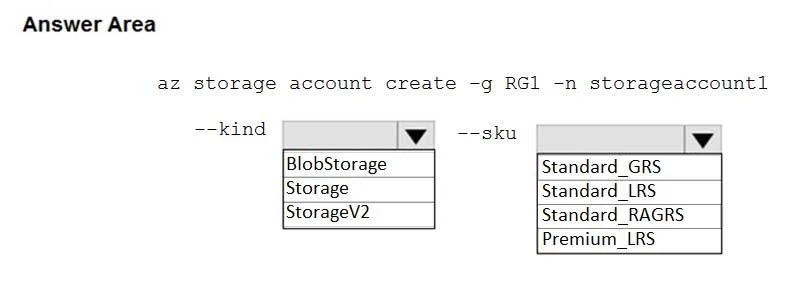
Answer Area
- --kindStorageV2BlobStorageStorageStorageV2
- --skuStandard_GRSStandard_GRSStandard_LRSStandard_RAGRSPremium_LRS
Explanation
To meet the requirements of supporting all blob tiers, minimizing costs, and providing cross-region fault tolerance, a General-purpose v2 storage account with Geo-redundant Storage (GRS) is the most suitable choice.
Approach. The correct interaction involves selecting 'StorageV2' for the --kind parameter and 'Standard_GRS' for the --sku parameter.
-
--kind StorageV2: This selection fulfills the requirement to 'support hot, cool, and archive blob tiers' and 'minimizes costs'. General-purpose v2 (GPv2) storage accounts are recommended for most scenarios as they support all access tiers (Hot, Cool, Archive) for blobs and generally offer the lowest per-gigabyte pricing compared to GPv1 or BlobStorage accounts. GPv2 accounts are also more feature-rich and support all storage types (blobs, files, queues, tables).
-
--sku Standard_GRS: This selection fulfills the requirement to 'provide fault tolerance if a disaster affects the Azure region where the account resides' while also 'minimizing costs'. Geo-Redundant Storage (GRS) replicates your data three times within a primary region and then asynchronously replicates it to a secondary region hundreds of miles away. This ensures data durability even in the event of a regional disaster. Among the geo-redundant options that provide cross-region fault tolerance (GRS and RAGRS), Standard_GRS is typically more cost-effective if read-access to the secondary region is not explicitly required, thus better meeting the 'minimizes costs' requirement.
Common mistakes.
- common_mistake. Selecting other options would fail to meet one or more requirements:
- --kind BlobStorage: While specialized for blobs, it primarily supports hot and cool tiers for specific scenarios and doesn't offer the same cost-effectiveness or flexibility for all tiers as GPv2. It also doesn't support other storage services like files or queues.
- --kind Storage: This refers to General-purpose v1 (GPv1) accounts. GPv1 accounts do not support the Cool or Archive blob tiers directly and are generally less cost-effective per gigabyte than GPv2 accounts.
- --sku Standard_LRS: Locally-Redundant Storage (LRS) replicates data three times within a single data center. It is the cheapest option but does NOT provide fault tolerance against an entire Azure region disaster.
- --sku Standard_RAGRS: Read-Access Geo-Redundant Storage (RAGRS) provides geo-redundancy and allows read access to the secondary region. While it meets the fault tolerance requirement, it is typically more expensive than Standard_GRS because of the additional read access capability, thus not 'minimizing costs' as effectively if read access to the secondary isn't a strict requirement.
- --sku Premium_LRS: Premium LRS uses SSDs for high-performance, low-latency storage. It is significantly more expensive than standard storage and only offers local redundancy (LRS), failing on both 'minimizes costs' and 'provides fault tolerance if a disaster affects the Azure region' requirements.
Concept tested. This question tests the understanding of Azure Storage account kinds (General-purpose v1, General-purpose v2, BlobStorage) and their associated features, particularly access tiers (Hot, Cool, Archive). It also assesses knowledge of Azure Storage redundancy options (LRS, GRS, RAGRS, ZRS) and their implications for data durability, availability, and cost optimization.
Reference. https://learn.microsoft.com/en-us/azure/storage/common/storage-account-overview
Topics
Community Discussion
No community discussion yet for this question.