
AZ-104 · Question #277
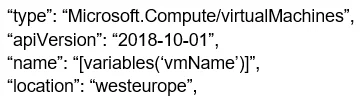
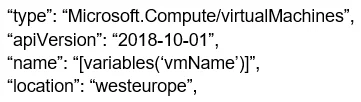
You have an Azure Resource Manager template named Template1 that is used to deploy an Azure virtual machine. Template1 contains the following text: The variables section in Template1 contains the…
The correct answer is A. Modify the location in the resource section to westus. You can change the location in resources. Parameters used to define the value of some variables to be able to use in different places in the template resources. Resources are used only for complicated expressions. In any case, RM will only deploy from resources. In case the…
Question
Exhibits
Options
- AModify the location in the resource section to westus
- BSelect West US during the deployment
- CModify the location in the variables section to westus
How the community answered
(58 responses)- A81% (47)
- B7% (4)
- C12% (7)
Explanation
You can change the location in resources. Parameters used to define the value of some variables to be able to use in different places in the template resources. Resources are used only for complicated expressions. In any case, RM will only deploy from resources. In case the value is not mentioned directly, then it will check parameters if it is specified in the resources. Based on this question, the value of location is defined directly in resources. so you change the resources Use location parameter. To allow flexibility when deploying your template, use a parameter to specify the location for resources. Set the default value of the parameter to resourceGroup().location. https://docs.microsoft.com/en-us/azure/azure-resource-manager/templates/resource- location?tabs=azure-powershell https://docs.microsoft.com/en-us/azure/azure-resource-manager/templates/template- syntax#resources
Community Discussion
No community discussion yet for this question.