
AZ-104 · Question #212
Case Study 1 - Humongous Insurance Overview Humongous Insurance is an insurance company that has three offices in Miami, Tokyo and Bangkok. Each office has 5.000 users. Existing Environment Active…
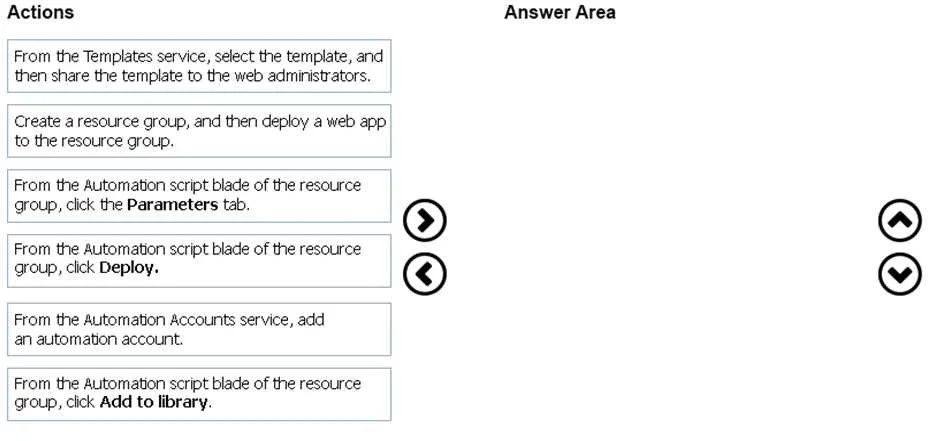
The correct answer is Create a resource group, and then deploy a web app to the resource group.; From the Automation script blade of the resource group, click Add to library.; From the Templates service, select the template, and then share the template to the web administrators.; From the Automation script blade of the resource group, click the Parameters tab. The correct sequence for deploying a resource group template involves: first creating a resource group and deploying a web app to it, then accessing the Automation script blade to review and save the template, and finally using 'Add to library' to save it for reuse or sharing…
Question
Exhibits
Answer Area
Drag items
Correct arrangement
- Create a resource group, and then deploy a web app to the resource group.
- From the Automation script blade of the resource group, click Add to library.
- From the Templates service, select the template, and then share the template to the web administrators.
- From the Automation script blade of the resource group, click the Parameters tab.
Explanation
The correct sequence for deploying a resource group template involves: first creating a resource group and deploying a web app to it, then accessing the Automation script blade to review and save the template, and finally using 'Add to library' to save it for reuse or sharing. This workflow follows the Azure Resource Manager (ARM) template export and reuse pattern, allowing administrators to capture infrastructure-as-code from existing deployments and redeploy or share them systematically.
Topics
Community Discussion
No community discussion yet for this question.