
AZ-104 · Question #186
Hotspot Question You have an Azure subscription that contains the public load balancers shown in the following table. You plan to create six virtual machines and to load balance requests to the…
The virtual machines load balanced by an Azure Load Balancer must fundamentally reside in the same virtual network for connectivity and ideally be part of the same Availability Set or Virtual Machine Scale Set for high availability.
Question
Exhibit
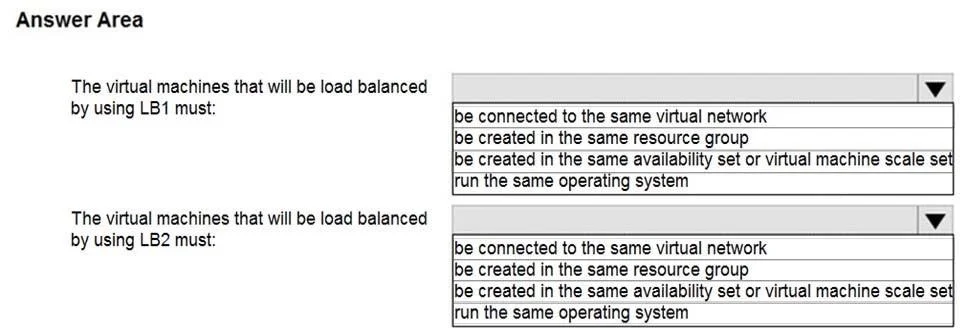
Answer Area
- The virtual machines that will be load balanced by using LB1 must:be connected to the same virtual networkbe created in the same resource groupbe created in the same availability set or virtual machine scale setrun the same operating system
- The virtual machines that will be load balanced by using LB2 must:be connected to the same virtual networkbe created in the same resource groupbe created in the same availability set or virtual machine scale setrun the same operating system
Explanation
The virtual machines load balanced by an Azure Load Balancer must fundamentally reside in the same virtual network for connectivity and ideally be part of the same Availability Set or Virtual Machine Scale Set for high availability.
Approach. The correct interaction is to select 'be created in the same availability set or virtual machine scale set' for LB1 and 'be connected to the same virtual network' for LB2. This differentiates between a best practice for high availability and a fundamental networking requirement:
- For LB1: 'be created in the same availability set or virtual machine scale set': When deploying virtual machines behind a load balancer for production or critical workloads, it is a best practice to place them in an Availability Set (AS) or Virtual Machine Scale Set (VMSS). This ensures high availability by distributing VMs across different fault domains and update domains, protecting applications from single points of failure. Using an AS/VMSS implicitly means the VMs will also be connected to a virtual network (which must be the same as the load balancer's VNet for connectivity). This option emphasizes the resilience and fault tolerance aspect, which is a primary reason for using load balancers in a robust solution.
- For LB2: 'be connected to the same virtual network': This is an absolute, fundamental, and non-negotiable networking requirement for any backend virtual machine to be discoverable and reachable by an Azure Load Balancer. An Azure Load Balancer can only distribute traffic to VMs that are part of its backend pool and reside within the same virtual network as the load balancer's frontend IP configuration. Without this baseline connectivity, load balancing is impossible.
Common mistakes.
- common_mistake. Selecting other options would be incorrect because:
- 'be created in the same resource group': While it's common practice to group related resources in the same resource group for organizational, management, and billing purposes, it is not a technical requirement for Azure Load Balancer functionality. VMs can be in different resource groups and still be part of the same virtual network and backend pool.
- 'run the same operating system': The operating system of the backend virtual machines has no bearing on the functionality of the Azure Load Balancer itself. VMs can run different operating systems (e.g., Windows and Linux) or different versions, as long as they are configured to provide the desired application service on the configured port and protocol.
Concept tested. This question tests the understanding of Azure Load Balancer's backend pool requirements, including fundamental network connectivity (VMs must be in the same virtual network as the load balancer) and best practices for achieving high availability and resilience (deploying VMs into Availability Sets or Virtual Machine Scale Sets). It highlights the distinction between core functional prerequisites and architectural best practices for robust cloud deployments.
Topics
Community Discussion
No community discussion yet for this question.