
AZ-104 · Question #136
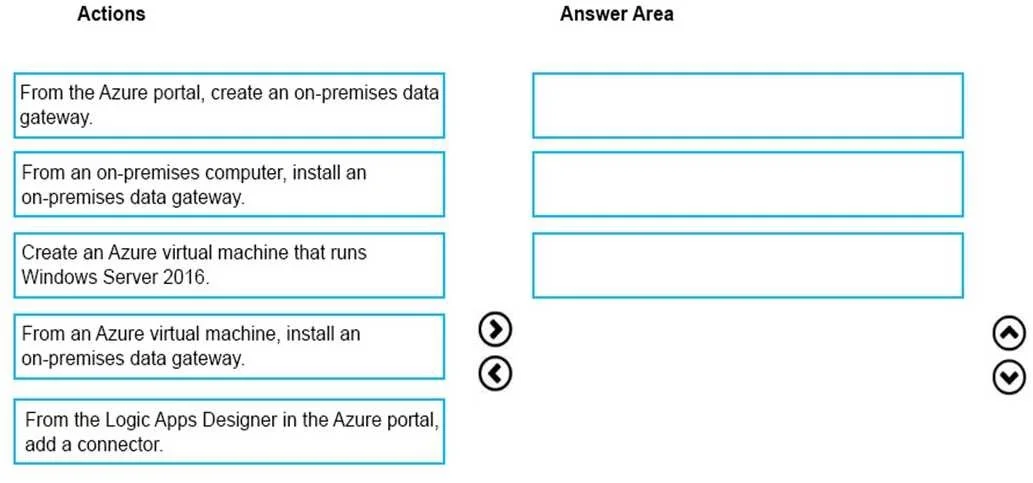
Drag and Drop Question You have an on-premises network that includes a Microsoft SQL Server instance named SQL1. You create an Azure Logic App named App1. You need to ensure that App1 can query a…
The correct answer is From an on-premises computer, install an on-premises data gateway.; From the Azure portal, create an on-premises data gateway.; From the Logic Apps Designer in the Azure portal, add a connector. To connect Azure Logic Apps to an on-premises SQL Server, you must first install the on-premises data gateway software on a local machine that has access to SQL1, then register/create that gateway resource in the Azure portal to link it to your Azure subscription, and finally…
Question
Exhibit
Answer Area
Drag items
Correct arrangement
- From an on-premises computer, install an on-premises data gateway.
- From the Azure portal, create an on-premises data gateway.
- From the Logic Apps Designer in the Azure portal, add a connector.
Explanation
To connect Azure Logic Apps to an on-premises SQL Server, you must first install the on-premises data gateway software on a local machine that has access to SQL1, then register/create that gateway resource in the Azure portal to link it to your Azure subscription, and finally add a SQL Server connector in the Logic Apps Designer that references the registered gateway. This three-step sequence (install → register in portal → add connector) is the standard Microsoft-supported pattern for bridging on-premises data sources with cloud-based Logic Apps without requiring a VPN or ExpressRoute.
Topics
Community Discussion
No community discussion yet for this question.