
AZ-104 · Question #119
Hotspot Question You have an Azure subscription named Subscription1. Subscription1 contains the resources in the following table. VNet1 is in RG1. VNet2 is in RG2. There is no connectivity between…
This question tests your knowledge of how to move Azure virtual machines between virtual networks with minimal administrative effort. Since VMs cannot be directly moved between VNets, you need to use a snapshot/disk-based approach.
Question
Exhibits
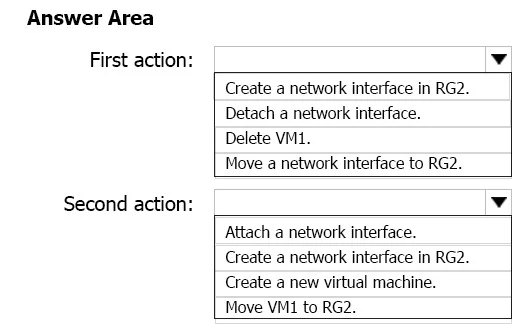
Answer Area
- First action:Create a network interface in RG2.Detach a network interface.Delete VM1.Move a network interface to RG2.
- Second action:Attach a network interface.Create a network interface in RG2.Create a new virtual machine.Move VM1 to RG2.
Explanation
This question tests your knowledge of how to move Azure virtual machines between virtual networks with minimal administrative effort. Since VMs cannot be directly moved between VNets, you need to use a snapshot/disk-based approach.
Approach. The correct two actions are: (1) Create a snapshot of Disk1 (the OS disk attached to VM1), and (2) Create a new virtual machine in RG2 using the snapshot, connecting it to VNet2. Since Azure VMs cannot be directly migrated between virtual networks, the recommended approach with minimal effort is to snapshot the existing disk, then create a new VM from that snapshot in the target resource group and virtual network. This preserves the custom application installed on VM1 without needing to reinstall or reconfigure anything manually. Moving the VM to RG2 first would not change its VNet association, so you still need the snapshot approach to get it onto VNet2.
Concept tested. Azure Virtual Machine mobility between Virtual Networks - VMs are bound to the VNet/subnet selected at creation time and cannot be directly reassigned to a different VNet. The correct method to 'move' a VM to a different VNet is to capture a snapshot of its disk(s), then deploy a new VM from that snapshot into the desired VNet. Simply moving the VM to a different resource group does not change its network association.
Reference. https://docs.microsoft.com/en-us/azure/virtual-machines/windows/snapshot-copy-managed-disk
Topics
Community Discussion
No community discussion yet for this question.