
AZ-101 · Question #45
SIMULATION This is a lab or performance-based testing (PBT) section. The following section of the exam is a lab. In this section, you will perform a set of tasks in a live environment. While most…
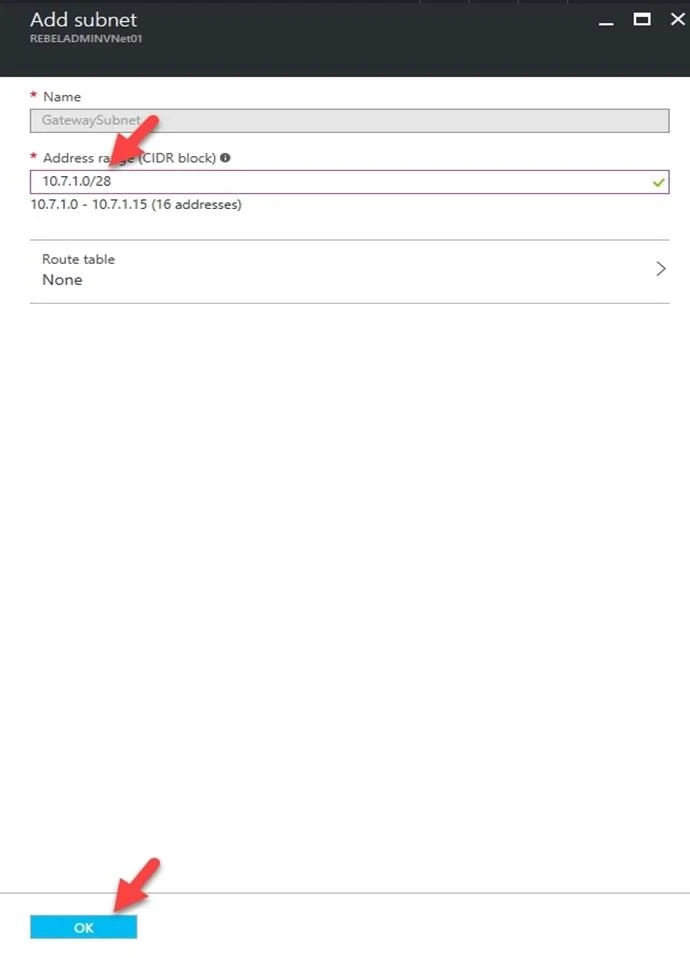
The correct answer is A. See below explanation. We need to create a Gateway subnet Go to More Services > Virtual Networks Then click on the VNET1017, and click on subnets. Then click on gateway subnet. In the next window define the subnet for the gateway and click OK It is recommended to use /28 or /27 for gateway subnet. As…
Question
SIMULATION This is a lab or performance-based testing (PBT) section. The following section of the exam is a lab. In this section, you will perform a set of tasks in a live environment. While most functionality will be available to you as it would be in a live environment, some functionality (e.g., copy and paste, ability to navigate to external websites) will not be possible by design. Scoring is based on the outcome of performing the tasks stated in the lab. In other words, it doesn’t matter how you accomplish the task, if you successfully perform it, you will earn credit for that task. Labs are not timed separately, and this exam may have more than one lab that you must complete. You can use as much time as you would like to complete each lab. But, you should manage your time appropriately to ensure that you are able to complete the lab(s) and all other sections of the exam in the time provided. Please, note that once you submit your work by clicking the Next button within a lab, you will NOT be able to return to the lab. To start the lab You may start lab by clicking the Next button Tasks Click to expand each objectiveas To connect to the Azure portal, type https:/portal.azure.com in the browser address bar. You plan to connect a virtual network named VNET1017 to your on-premises network by using both an Azure ExpressRoute and a site-to-site VPN connection. You need to prepare the Azure environment for the planned deployment. The solution must maximize the IP address space available to Azure virtual machines. What should you do from the Azure portal before you create the ExpressRoute and the VPN gateway?
Exhibit
Options
- ASee below explanation
How the community answered
(36 responses)- A100% (36)
Explanation
We need to create a Gateway subnet Go to More Services > Virtual Networks Then click on the VNET1017, and click on subnets. Then click on gateway subnet. In the next window define the subnet for the gateway and click OK It is recommended to use /28 or /27 for gateway subnet. As we want to maximize the IP address space we should use /27. https://blogs.technet.microsoft.com/canitpro/2017/06/28/step-by-step-configuring-a-site-to-site- vpn-gateway-between-azure-and-on-premise/
Topics
Community Discussion
No community discussion yet for this question.