
Google
ASSOCIATE-CLOUD-ENGINEER · Question #97
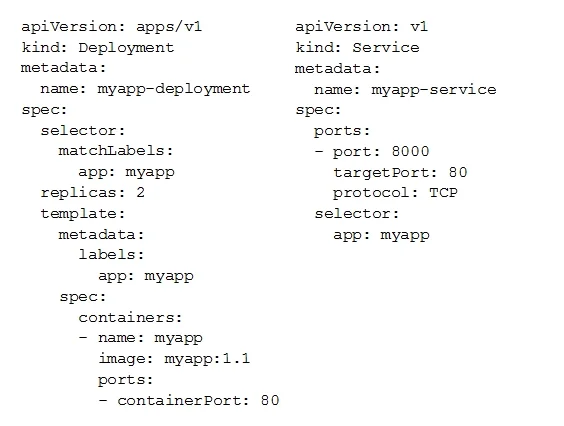
You deployed a new application inside your Google Kubernetes Engine cluster using the YAML file specified below. You check the status of the deployed pods and notice that one of them is still in…
The correct answer is C. Review details of myapp-deployment-58ddbbb995-lp86m Pod and check for warning messages. https://kubernetes.io/docs/tasks/debug-application-cluster/debugapplication/#debugging-pods You can't view logs of a pod that isn't deployed, so D is incorrect. C allows you to check the pod deployment messages and look for errors.
Submitted by renata2k· Mar 30, 2026Ensuring successful operation of a cloud solution
Question
You deployed a new application inside your Google Kubernetes Engine cluster using the YAML file specified below. You check the status of the deployed pods and notice that one of them is still in PENDING status: You want to find out why the pod is stuck in pending status. What should you do?
Exhibits

Options
- AReview details of the myapp-service Service object and check for error messages.
- BReview details of the myapp-deployment Deployment object and check for error messages.
- CReview details of myapp-deployment-58ddbbb995-lp86m Pod and check for warning messages.
- DView logs of the container in myapp-deployment-58ddbbb995-lp86m pod and check for warning
How the community answered
(43 responses)- A5% (2)
- B12% (5)
- C77% (33)
- D7% (3)
Explanation
https://kubernetes.io/docs/tasks/debug-application-cluster/debugapplication/#debugging-pods You can't view logs of a pod that isn't deployed, so D is incorrect. C allows you to check the pod deployment messages and look for errors.
Topics
#GKE troubleshooting#pod PENDING status#kubectl describe#scheduling issues
Community Discussion
No community discussion yet for this question.