
AI-102 · Question #440
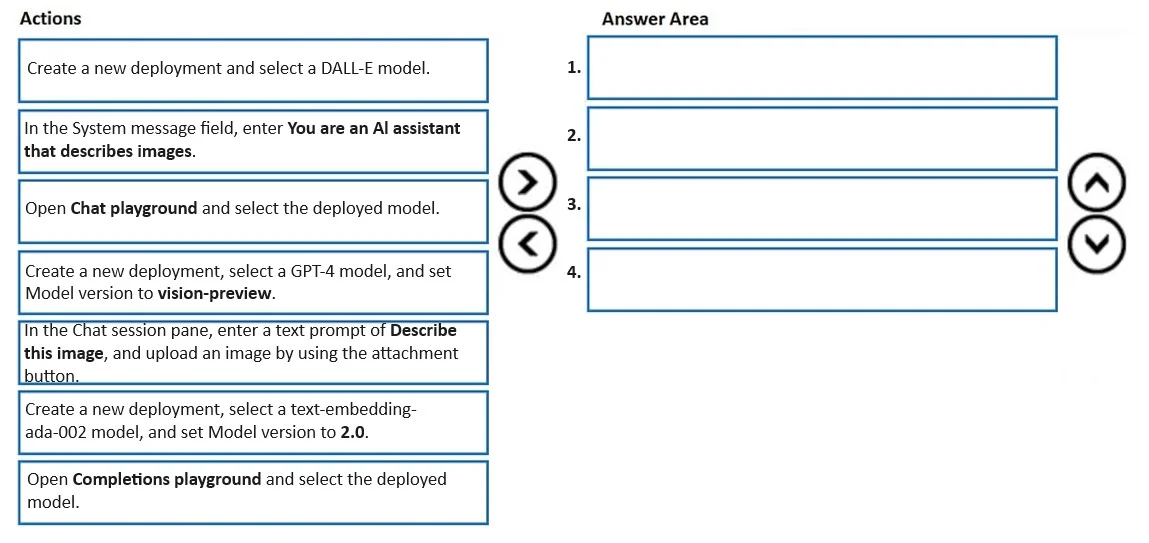
Drag and Drop Question You have an Azure subscription that contains an Azure OpenAI resource named AI1. You need to analyze an image to obtain a text description. Which four actions should you…
The correct answer is Create a new deployment and select a DALL-E model.; In the System message field, enter 'You are an AI assistant that describes images.'; Open Chat playground and select the deployed model.; In the Chat session pane, enter a text prompt of 'Describe this image,' and upload an image by using the attachment button. To analyze an image and obtain a text description using Azure OpenAI Studio, you must use GPT-4 with the 'vision-preview' model version, as it is the only model capable of processing and describing images (multimodal capability). The correct sequence is: (1) Create a new…
Question
Exhibit
Answer Area
Drag items
Correct arrangement
- Create a new deployment and select a DALL-E model.
- In the System message field, enter 'You are an AI assistant that describes images.'
- Open Chat playground and select the deployed model.
- In the Chat session pane, enter a text prompt of 'Describe this image,' and upload an image by using the attachment button.
Explanation
To analyze an image and obtain a text description using Azure OpenAI Studio, you must use GPT-4 with the 'vision-preview' model version, as it is the only model capable of processing and describing images (multimodal capability). The correct sequence is: (1) Create a new deployment with GPT-4 vision-preview, (2) Open Chat playground and select the deployed model, (3) Enter a system message defining the AI assistant's role, and (4) In the Chat session pane, enter 'Describe this image' and upload the image using the attachment button. This workflow leverages GPT-4V's vision capabilities to analyze visual content and return a natural language description.
Topics
Community Discussion
No community discussion yet for this question.