
AI-102 · Question #325
Drag and Drop Question You have a monitoring solution that uses the Azure AI Anomaly Detector service. You provision a server named Server1 that has intermittent internet access. You need to deploy…
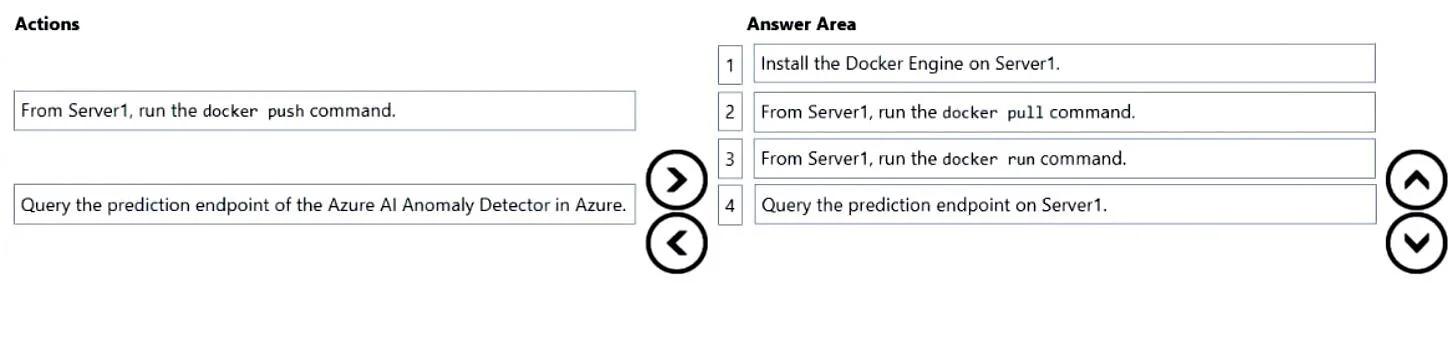
The correct answer is Install the Docker Engine on Server1.; From Server1, run the docker pull command.; From Server1, run the docker run command.; Query the prediction endpoint on Server1. To deploy Azure AI Anomaly Detector as a container on Server1 (which has intermittent internet access), you must first install Docker Engine to enable container support, then pull the Anomaly Detector container image from Microsoft Container Registry, then run the container…
Question
Exhibit
Answer Area
Drag items
Correct arrangement
- Install the Docker Engine on Server1.
- From Server1, run the docker pull command.
- From Server1, run the docker run command.
- Query the prediction endpoint on Server1.
Explanation
To deploy Azure AI Anomaly Detector as a container on Server1 (which has intermittent internet access), you must first install Docker Engine to enable container support, then pull the Anomaly Detector container image from Microsoft Container Registry, then run the container locally, and finally query the local prediction endpoint on Server1. This approach allows the service to function offline during internet outages since the container runs locally after the initial pull.
Topics
Community Discussion
No community discussion yet for this question.