
AI-102 · Question #277
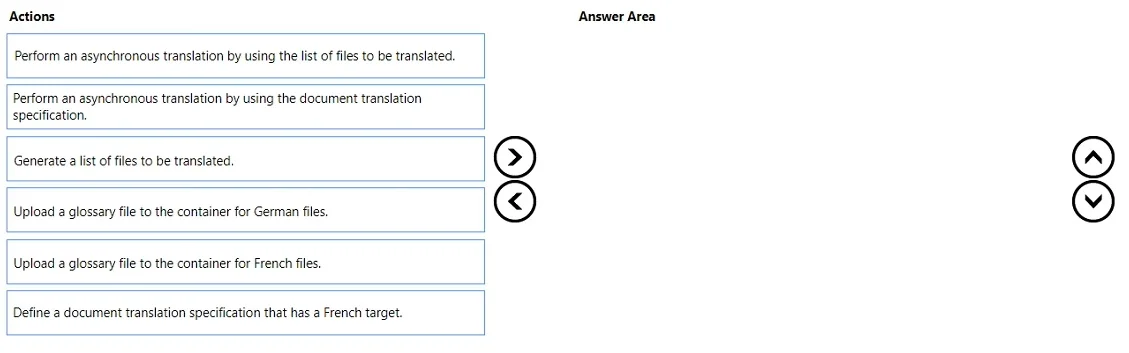
Drag and Drop Question You have a collection of Microsoft Word documents and PowerPoint presentations in German. You need to create a solution to translate the files to French. The solution must…
The correct answer is Upload a glossary file to the container for German files.; Define a document translation specification that has a French target.; Perform an asynchronous translation by using the document translation specification. The correct sequence is: (1) Upload a glossary file to the container for French files - glossary files must be in the target language container and referenced in the translation spec. (2) Define a document translation specification that has a French target - this specification…
Question
Exhibit
Answer Area
Drag items
Correct arrangement
- Upload a glossary file to the container for German files.
- Define a document translation specification that has a French target.
- Perform an asynchronous translation by using the document translation specification.
Explanation
The correct sequence is: (1) Upload a glossary file to the container for French files - glossary files must be in the target language container and referenced in the translation spec. (2) Define a document translation specification that has a French target - this specification links the source container, target container, glossary, and translation settings, which is required to preserve formatting and use a custom glossary. (3) Perform an asynchronous translation using the document translation specification - Azure Cognitive Services Document Translation uses asynchronous batch translation with a full specification object (not a simple file list) to handle Office formats like .docx and .pptx while preserving formatting. This approach uses Azure Blob Storage containers and the Document Translation API, which natively preserves document structure and supports custom glossaries.
Topics
Community Discussion
No community discussion yet for this question.