
AI-102 · Question #261
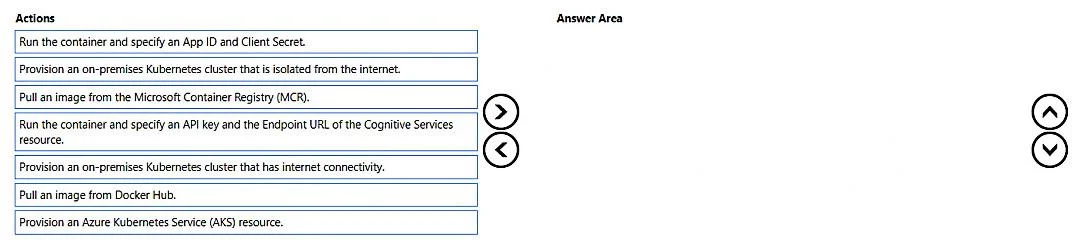
Drag and Drop Question You are building an app that will scan confidential documents and use the Azure AI Language service to analyze the contents. You provision an Azure AI Services resource. You…
The correct answer is Pull an image from the Microsoft Container Registry (MCR).; Provision an on-premises Kubernetes cluster that is isolated from the internet.; Run the container and specify an API key and the Endpoint URL of the Cognitive Services resource. Explanation: Azure AI Language Service with On-Premises Containers The core requirement is: analyze documents using Azure AI Language, but keep documents on-premises. Azure supports this via disconnected/containerized cognitive services - you run the AI model locally, documents…
Question
Exhibit
Answer Area
Drag items
Correct arrangement
- Pull an image from the Microsoft Container Registry (MCR).
- Provision an on-premises Kubernetes cluster that is isolated from the internet.
- Run the container and specify an API key and the Endpoint URL of the Cognitive Services resource.
Explanation
Explanation: Azure AI Language Service with On-Premises Containers
The core requirement is: analyze documents using Azure AI Language, but keep documents on-premises. Azure supports this via disconnected/containerized cognitive services - you run the AI model locally, documents never leave your network.
Step-by-Step Breakdown
Step 1: Pull an image from the Microsoft Container Registry (MCR)
Azure AI Services are distributed as Docker container images via MCR (not Docker Hub). You must pull the correct Language service image before you can run anything. This is the logical first step - you need the artifact before you can deploy or run it.
- Why not Docker Hub? Official Microsoft AI Service containers are hosted on MCR, not Docker Hub. Using Docker Hub would mean either a non-official image or failure to find the image.
Step 2: Provision an on-premises Kubernetes cluster that is isolated from the internet
The container is deployed to an on-premises, internet-isolated cluster. This is the key architectural decision that satisfies the "confidential documents remain on-premises" requirement.
- Why isolated from the internet? Documents are confidential - an internet-connected cluster risks data egress. Isolation ensures documents processed by the container never traverse the public internet.
- Why not AKS? Azure Kubernetes Service (AKS) runs in Azure, meaning documents would leave your premises - directly violating the requirement.
- Why not internet-connected on-premises? An internet-connected cluster, while still on-premises, introduces unnecessary risk for confidential data. The isolated option is the stricter, correct choice.
Step 3: Run the container and specify an API key and the Endpoint URL of the Cognitive Services resource
When running Azure AI containers, you must pass your Azure AI Services API key and Endpoint URL as environment variables. The container uses these to authenticate with Azure for billing and licensing only - actual document data stays local.
- Why API key + Endpoint, not App ID + Client Secret? App ID/Client Secret is an OAuth pattern used by Azure Active Directory app registrations - not the authentication model for Azure AI Services containers. Cognitive Services containers use API key authentication.
- Why does this work even on an isolated cluster? The container only calls Azure to report metering/billing. The document content is processed entirely locally. This is the "connected container" model - minimal outbound traffic for telemetry only, zero inbound document data.
Common Misconceptions
| Misconception | Reality |
|---|---|
| "Use Docker Hub for container images" | Azure AI containers are on MCR, not Docker Hub |
| "AKS keeps data on-premises" | AKS runs in Azure - data leaves your premises |
| "An internet-connected cluster is fine since it's on-premises" | For confidential data, isolation is required - connectivity is a risk vector |
| "App ID + Client Secret is the right auth method" | That's AAD OAuth. Cognitive Services containers use API key + Endpoint |
Summary
The solution uses Azure's container deployment model for AI services: pull the image -> deploy to an isolated on-premises cluster -> authenticate the container against your Azure resource for billing. Documents are processed locally; only licensing telemetry touches Azure.
Topics
Community Discussion
No community discussion yet for this question.