
Microsoft
AI-102 · Question #193
SIMULATION Use the following login credentials as needed: - To enter your username, place your cursor in the Sign in box and click on the username below. - To enter your password, place your cursor…
The task is to restrict access to an existing Azure AI Vision service (caption12345678) to a specific virtual network (VNet1) using a private endpoint.
Submitted by rohit_dlh· Mar 30, 2026Implement security for solution components
Question
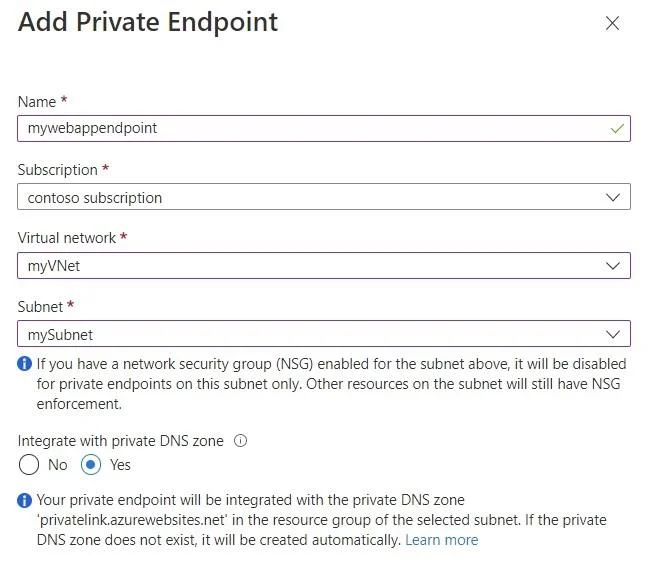
SIMULATION Use the following login credentials as needed: - To enter your username, place your cursor in the Sign in box and click on the username below. - To enter your password, place your cursor in the Enter password box and click on the password below. Azure Username: [email protected] Azure Password: XXXXXXXXXXXX The following information is for technical support purposes only: - Lab Instance: 12345678 Task You plan to build an application that will use caption12345678. The application will be deployed to a virtual network named VNet1. You need to ensure that only virtual machines on VNet1 can access caption12345678. To complete this task, sign in to the Azure portal. Answer: Step 1: Create private endpoint for your web app 1. In the left-hand menu, select All Resources > caption12345678 - the name of your web app. 2. In the web app overview, select Settings > Networking. 3. In Networking, select Private endpoints. 4. Select + Add in the Private Endpoint connections page. 5. Enter or select the following information in the Add Private Endpoint page: Name: Enter caption12345678. Subscription Select your Azure subscription. Virtual network Select VNet1. Subnet: Integrate with private DNS zone: Select Yes. 6. Select OK. Reference: https://docs.microsoft.com/en-us/azure/private-link/tutorial-private-endpoint-webapp-portal
Exhibit
Explanation
The task is to restrict access to an existing Azure AI Vision service (caption12345678) to a specific virtual network (VNet1) using a private endpoint.
Concept tested. Securing Azure AI service with Private Endpoint
Topics
#Azure Private Endpoint#App Service private access#Virtual Network connectivity
Community Discussion
No community discussion yet for this question.