
Aruba
ACMP_6.3 · Question #12
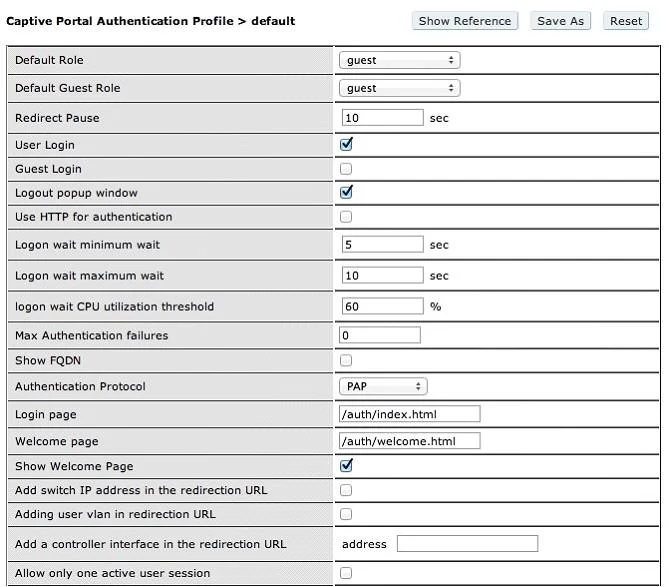
A user logged in with the Captive Portal settings shown in the above screen capture. What does the user need to do to logout?
The correct answer is C. click Logout on the browser screen. See the full explanation below for the reasoning.
Question
A user logged in with the Captive Portal settings shown in the above screen capture. What does the user need to do to logout?
Exhibit
Options
- Await 30 minutes then logout
- Bwait 60 minutes then logout
- Cclick Logout on the browser screen
- Dhe cannot logout
- Ewait 10 seconds for redirect
How the community answered
(61 responses)- A3% (2)
- B13% (8)
- C75% (46)
- D2% (1)
- E7% (4)
Community Discussion
No community discussion yet for this question.