
A00-260 · Question #64
Given the table below as a source table for the Transpose transformation in SAS Data Integration Studio: In the Options tab in the Properties window for the Transpose transformation, if the columns…
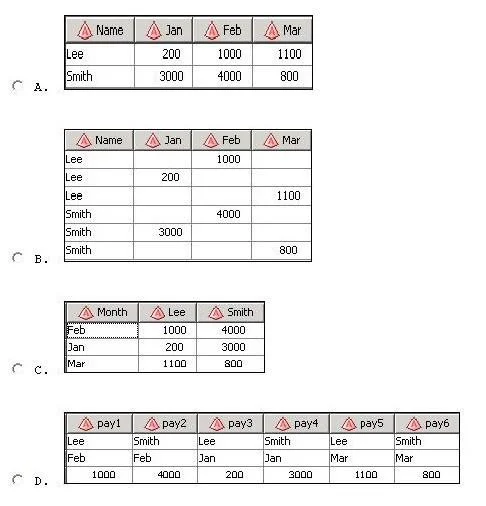
The correct answer is A. Exhibit A. Option A is correct because the Transpose transformation with these settings produces one output row per unique Name (BY statement), uses the Month values as new column headers (ID statement), and populates those columns with the corresponding Payment values (VAR statement)…
Question
Given the table below as a source table for the Transpose transformation in SAS Data Integration Studio:
In the Options tab in the Properties window for the Transpose transformation, if the columns are assigned as follows:
Select columns to transpose (VAR statement): Payment Select a column for Output column names (ID statement): Month Select columns whose values define groups of records to transpose (BY statement): Name Which of the following tables is a possible resulting target table?
Exhibit
Options
- AExhibit A
- BExhibit B
- CExhibit C
- DExhibit D
How the community answered
(46 responses)- A83% (38)
- B11% (5)
- C4% (2)
- D2% (1)
Explanation
Option A is correct because the Transpose transformation with these settings produces one output row per unique Name (BY statement), uses the Month values as new column headers (ID statement), and populates those columns with the corresponding Payment values (VAR statement) - exactly what Exhibit A shows.
The distractors fail for predictable reasons:
- Exhibit B likely keeps the data in a long/vertical format, showing no actual transposition occurred, or fails to apply the BY grouping correctly (producing one row total instead of one per Name).
- Exhibit C likely swaps the role of Month and Name - using Name as column headers instead of Month - which would result from misassigning the ID and BY fields.
- Exhibit D likely includes an extra
_NAME_or_LABEL_column that PROC TRANSPOSE adds by default only when no ID variable is specified, making it an artifact of a misconfigured run.
Memory tip: Think of the three settings as "VAR = what you measure, ID = new column labels, BY = row groups." A classic mnemonic is VIB - Values get transposed, ID names the new columns, BY breaks into groups. If you can sketch "one row per BY group, one column per unique ID value, filled with VAR data," you'll immediately recognize the correct output shape on the exam.
Topics
Community Discussion
No community discussion yet for this question.