
9L0-521 · Question #86
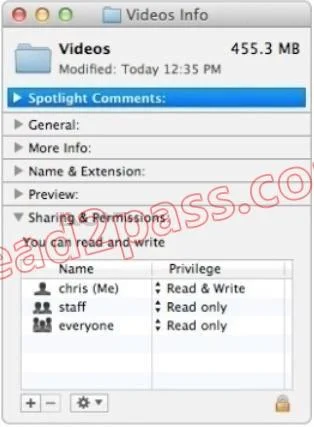
Using AFP, you copy a file from your Mac into the shared folder shown above. Members of the staff group report that they are unable to edit the file. Assuming no ACLs have been configured, what is…
The correct answer is D. The group permission for the file is set to read-only. As you can see that the staff has Read Only permission. They can never edit the files because they don't have Read & Write permission. It is only granted to Chris who is the administrator.
Question
Using AFP, you copy a file from your Mac into the shared folder shown above. Members of the staff group report that they are unable to edit the file. Assuming no ACLs have been configured, what is the MOST LIKELY reason for this issue?
Exhibit
Options
- AEveryone permissions apply to the staff group because the staff group's GIO has been changed.
- BThe file is locked.
- CMembers of the staff group do not have write access to /tmp/_cathes on the server.
- DThe group permission for the file is set to read-only.
How the community answered
(26 responses)- A15% (4)
- B8% (2)
- C4% (1)
- D73% (19)
Explanation
As you can see that the staff has Read Only permission. They can never edit the files because they don't have Read & Write permission. It is only granted to Chris who is the administrator.
Topics
Community Discussion
No community discussion yet for this question.