
Apple
9L0-420 · Question #7
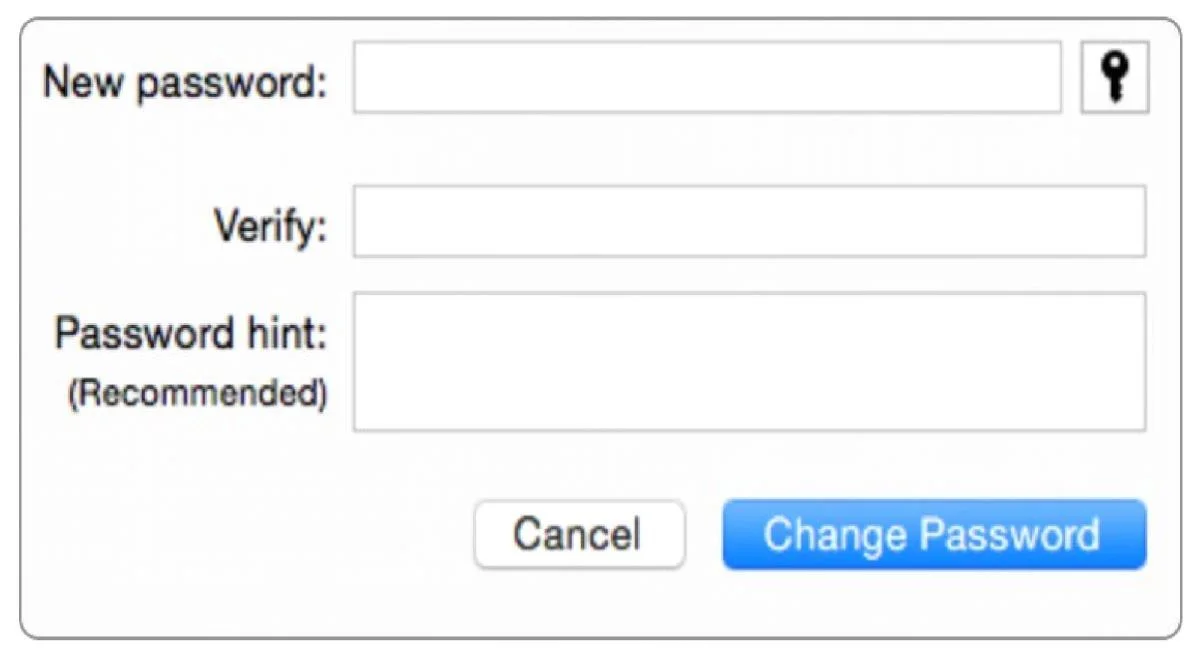
Review the screenshot then answer the question below. Using the interface shown in the screenshot, how can you make a Mac generate a random password?
The correct answer is D. Click the Key icon to open Password Assistant and choose Random from the Type pop-up menu. See the full explanation below for the reasoning.
Question
Review the screenshot then answer the question below. Using the interface shown in the screenshot, how can you make a Mac generate a random password?
Exhibit
Options
- AClick the Change Password button and choose Random from the New popup menu.
- BOption-click in the "New password" field and choose Random from the New pop-up menu.
- CControl-click in the "New password" field and choose Random from the New pop-up menu.
- DClick the Key icon to open Password Assistant and choose Random from the Type pop-up menu.
How the community answered
(54 responses)- A6% (3)
- B4% (2)
- C11% (6)
- D80% (43)
Community Discussion
No community discussion yet for this question.