
Apple
9L0-420 · Question #61
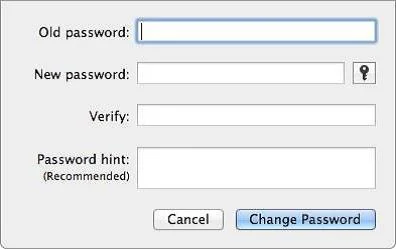
Review the screenshot, and then answer the question below. Using the interface shown in the screenshot above, how can you make a Mac generate a random password for you?
The correct answer is A. Click the Key icon to launch Password Assistant, and choose Random from the Type pop-up. See the full explanation below for the reasoning.
Question
Review the screenshot, and then answer the question below. Using the interface shown in the screenshot above, how can you make a Mac generate a random password for you?
Exhibit
Options
- AClick the Key icon to launch Password Assistant, and choose Random from the Type pop-up
- BControl-click in the New Password field, and choose Random from the New pop-up menu.
- CClick the Change Password button, and choose Random from the New pop-up menu.
- DOption-click in the New Password field, and choose Random from the New pop-up menu.
How the community answered
(50 responses)- A84% (42)
- B8% (4)
- C6% (3)
- D2% (1)
Community Discussion
No community discussion yet for this question.