
Apple
9L0-409 · Question #30
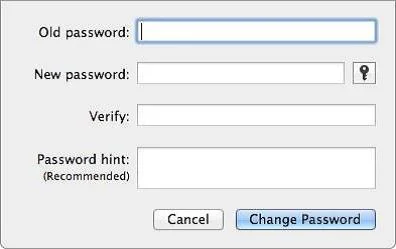
Review the screenshot, and then answer the question below. Using the interface shown in the screenshot above, how can you make a Mac generate a random password for you?
Sign in or unlock 9L0-409 to reveal the answer and full explanation for question #30. The question stem and answer options stay visible for context.
Question
Review the screenshot, and then answer the question below. Using the interface shown in the screenshot above, how can you make a Mac generate a random password for you?
Exhibit
Options
- AClick the Key icon to launch Password Assistant, and choose Random from the Type pop-up menu.
- BControl-click in the New Password field, and choose Random from the New pop-up menu.
- CClick the Change Password button, and choose Random from the New pop-up menu.
- DOption-click in the New Password field, and choose Random from the New pop-up menu.
Unlock 9L0-409 to see the answer
You've previewed enough free 9L0-409 questions. Unlock 9L0-409 for full answers, explanations, the timed quiz mode, progress tracking, and the master PDF. Question stem and options stay visible so you can still see what's on the exam.