
Apple
9L0-403 · Question #17
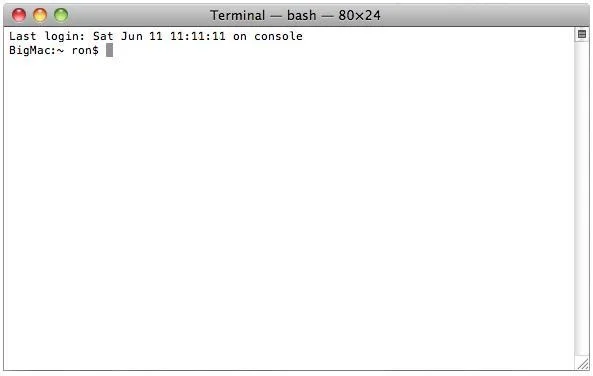
Review the screenshot, and then answer the question below. You open Terminal on your Mac OS X v10.6 computer, and see the window displayed in the screenshot above. What does the "~" indicate?
The correct answer is B. The current working directory. See the full explanation below for the reasoning.
Question
Review the screenshot, and then answer the question below. You open Terminal on your Mac OS X v10.6 computer, and see the window displayed in the screenshot above. What does the "~" indicate?
Exhibit
Options
- AThe current shell.
- BThe current working directory.
- CThe path to the admin command.
- DAn argument passed to the admin command.
How the community answered
(21 responses)- A5% (1)
- B76% (16)
- C14% (3)
- D5% (1)
Community Discussion
No community discussion yet for this question.