
Adobe
9A0-303 · Question #54
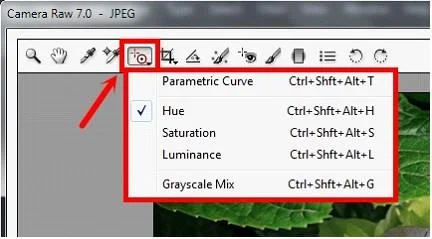
Which of the following statements are true about the Targeted Adjustment tool in Camera Raw? Each correct answer represents a complete solution. Choose all that apply.
Sign in or unlock 9A0-303 to reveal the answer and full explanation for question #54. The question stem and answer options stay visible for context.
Retouching and Color Correction
Question
Which of the following statements are true about the Targeted Adjustment tool in Camera Raw? Each correct answer represents a complete solution. Choose all that apply.
Exhibit
Options
- ADragging down or left increases values.
- BDragging down or left decreases values.
- CDragging up or right increases values.
- DThe keyboard shortcut T toggles the last Targeted Adjustment tool you used.
Unlock 9A0-303 to see the answer
You've previewed enough free 9A0-303 questions. Unlock 9A0-303 for full answers, explanations, the timed quiz mode, progress tracking, and the master PDF. Question stem and options stay visible so you can still see what's on the exam.
Topics
#Targeted Adjustment tool#Camera Raw#drag direction#keyboard shortcut