
Adobe
9A0-148 · Question #28
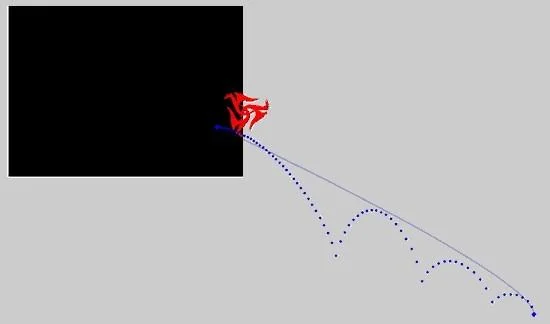
Click the Exhibit button. Adobe 9A0-148 Exam You've applied a motion preset and after applying it, realize that you have created it off the page. Assuming you wanted fidelity with the original…
The correct answer is D. Use the Free Transform tool to select the solid line and move appropriately. See the full explanation below for the reasoning.
Question
Click the Exhibit button. Adobe 9A0-148 Exam You've applied a motion preset and after applying it, realize that you have created it off the page. Assuming you wanted fidelity with the original motion preset, which approach would allow you to correct the placement of your animation?
Exhibit
Options
- AYou will have to remove the preset and start over. Presets can not be altered.
- BUse the Selection tool to move the image at the start of the animation sequence.
- CUse the Selection tool to move the image at the end of the animation sequence.
- DUse the Free Transform tool to select the solid line and move appropriately.
How the community answered
(35 responses)- A3% (1)
- B6% (2)
- C17% (6)
- D74% (26)
Community Discussion
No community discussion yet for this question.