
Adobe
9A0-031 · Question #79
You have rasterized a type layer so you can apply a filter to it. Which lock option in the Layers palette allows you to apply a Gaussian Blur filter but see NO effect?
The correct answer is D. Lock all. See the full explanation below for the reasoning.
Question
You have rasterized a type layer so you can apply a filter to it. Which lock option in the Layers palette allows you to apply a Gaussian Blur filter but see NO effect?
Exhibit
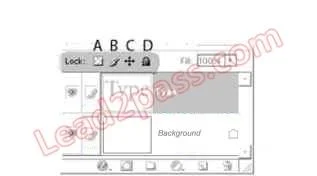
Options
- ALock transparent pixels
- BLock image pixels
- CLock position pixels
- DLock all
How the community answered
(52 responses)- A2% (1)
- B6% (3)
- C13% (7)
- D79% (41)
Community Discussion
No community discussion yet for this question.