
Adobe
9A0-031 · Question #44
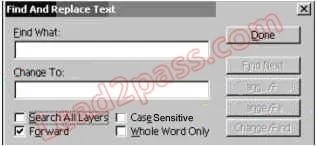
A document contains multiple type layers. You want to find and replace all occurrences of a word by using the Find and Replace Text command. What should you do?
The correct answer is C. enter the Find What and Change To text, select Search All Layers and Whole Word Only. See the full explanation below for the reasoning.
Question
A document contains multiple type layers. You want to find and replace all occurrences of a word by using the Find and Replace Text command. What should you do?
Exhibit
Options
- Aenter the Find What and Change To text, and deselect Search All Layers
- Benter the Find What and Change To text, select Search All layers and then click on Done
- Center the Find What and Change To text, select Search All Layers and Whole Word Only,
- Dmerge the Type layers, enter the Find What and Change To text, then select Whole Word
How the community answered
(34 responses)- A3% (1)
- B9% (3)
- C71% (24)
- D18% (6)
Community Discussion
No community discussion yet for this question.