nerdexam
Microsoft

98-372 · Question #37

Consider the following scenario. Ryan has just started an internship with Company Inc., as a developer. He is updating the company's inventory system to use barcode and GPS technologies for improving

The correct answer is B. Add a reference to the other project's classes.. The best way for Ryan is to add a reference to the other project's classes to use classes from InventoryProject. Take the following steps to add a reference to a .NET Framework component in 1.In Solution Explorer, right-click the References node for the project, and then select A

Understanding Namespaces and Classes

Question

Consider the following scenario. Ryan has just started an internship with Company Inc., as a developer. He is updating the company's inventory system to use barcode and GPS technologies for improving the package tracking. Ryan's manager asked him to use classes from the company's existing inventory system as much as possible to save time because the older code has been tested thoroughly. The classes are part of a Microsoft Visual Studio project called InventorySystem; Ryan's Visual Studio project is called TrackingSystem. Ryan is having problems because some of his classes, such as Package, Barcode, and Destination, have names that already exist in the InventorySystem. However, both projects use the default namespaces defined by Visual Studio .NET 2010 when the projects were created. Which of the following is the best way for Ryan to use classes from InventoryProject?

Exhibit
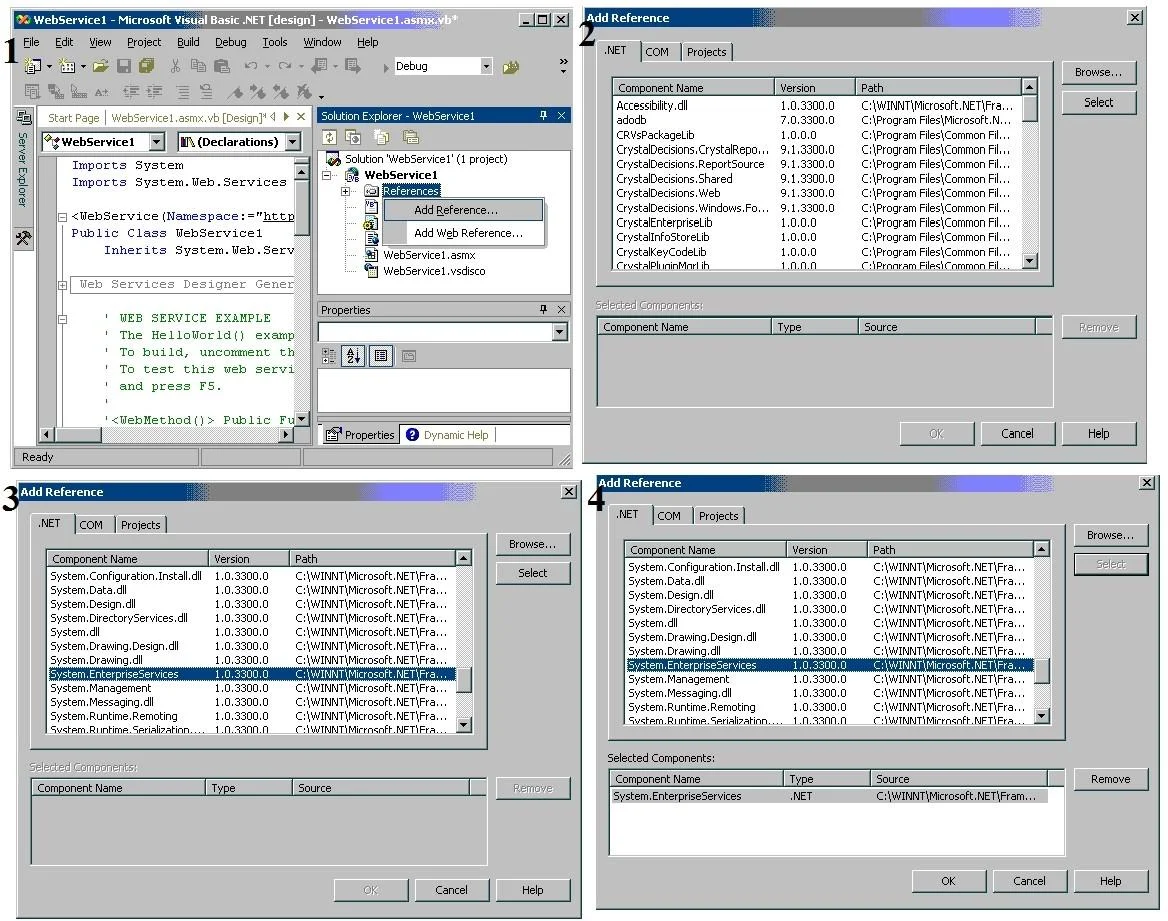
98-372 question #37 exhibit

Options

  • AAdd a class library to the other project's classes.
  • BAdd a reference to the other project's classes.
  • CUse the using directive.
  • DCopy and paste the code into the project.

How the community answered

(64 responses)
  • A
    13% (8)
  • B
    75% (48)
  • C
    3% (2)
  • D
    9% (6)

Explanation

The best way for Ryan is to add a reference to the other project's classes to use classes from InventoryProject. Take the following steps to add a reference to a .NET Framework component in 1.In Solution Explorer, right-click the References node for the project, and then select Add 2.In the Add Reference dialog box, select the .NET tab. 3.Select a component from the list, and click the Select button. This adds the component to the Selected Components pane of the Add Reference dialog box. 4.Click the OK button. This adds the selected reference under the References node of the Answer: D is incorrect. Copying and pasting the code into the project will not do anything. Answer: A is incorrect. The .NET Framework class library is prepared of namespaces. Each namespace holds types that can be used in classes, structures, enumerations, delegates, and interfaces. When a Visual Basic or Visual C# project is created in Visual Studio, the most common base class DLLs (assemblies) are already referenced. However, if a type has been used that is in a DLL not already referenced, it will be required to add a reference to the DLL. Answer: C is incorrect. The using directive has two uses, which are as follows: Allow the use of types in a namespace so that developers are not required to qualify the use of a type in that namespace: using System.Text; //This defines a namespace Create an alias for a namespace or a type. This is known as a using alias directive. using Project = PC.MyCompany.Project; // This defines an alias for the nested namespace

Topics

#project reference#class library#Visual Studio#cross-project reuse

Community Discussion

No community discussion yet for this question.

Full 98-372 Practice