
Microsoft
98-367 · Question #75
You are setting up Remote Desktop on your computer. Your computer is a member of a domain. Your firewall configuration is shown in the following image: You need to allow Remote Desktop to be able to…
Sign in or unlock 98-367 to reveal the answer and full explanation for question #75. The question stem and answer options stay visible for context.
Question
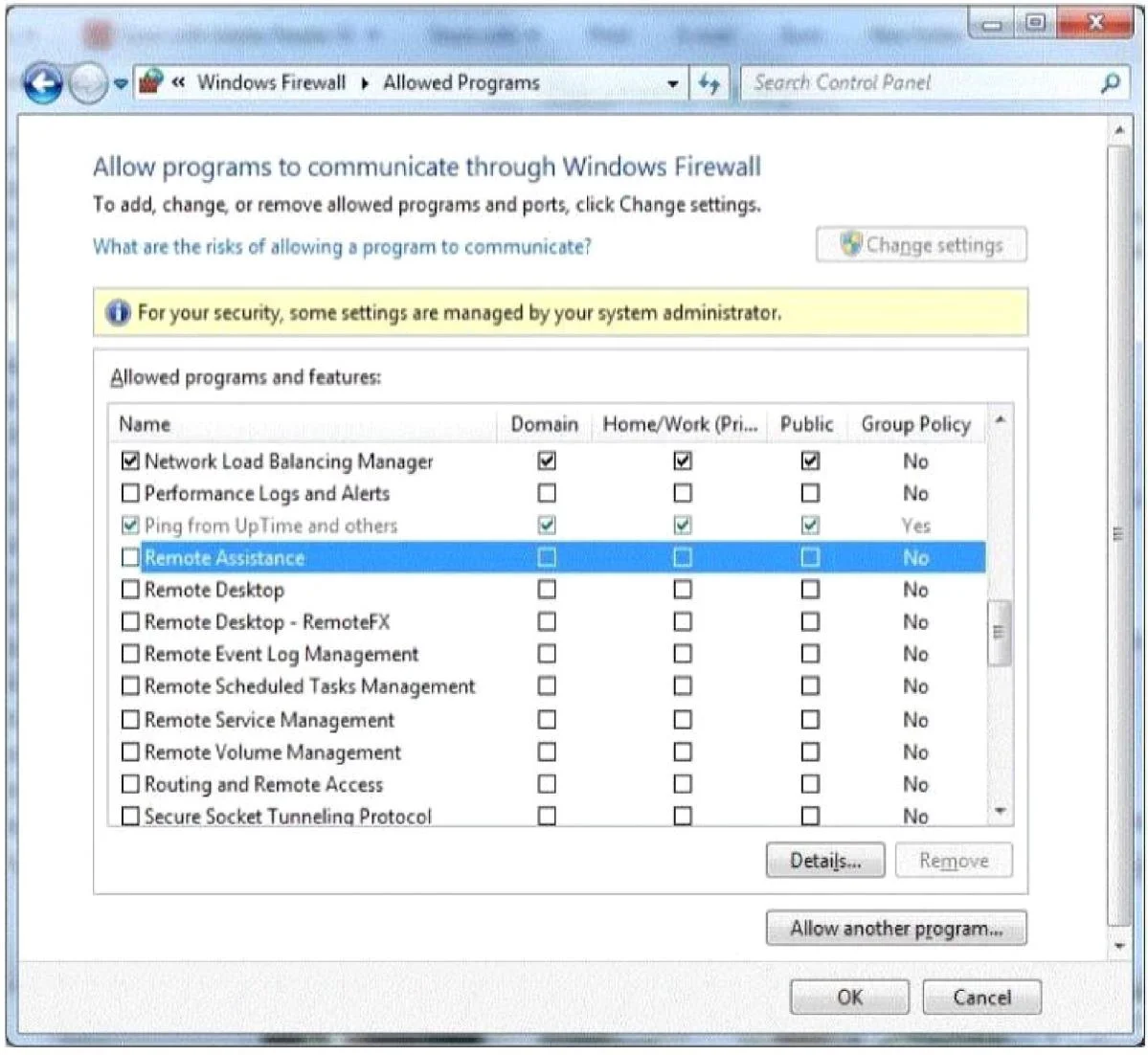
You are setting up Remote Desktop on your computer. Your computer is a member of a domain. Your firewall configuration is shown in the following image:
You need to allow Remote Desktop to be able to get through your firewall for users on your company's network. Which settings should you enable?
Exhibit
Options
- ARemote Assistance: Home/Work (Private)
- BRemote Desktop: Public
- CRemote Desktop: Home/Work (Private)
- DRemote Assistance: Domain
Unlock 98-367 to see the answer
You've previewed enough free 98-367 questions. Unlock 98-367 for full answers, explanations, the timed quiz mode, progress tracking, and the master PDF. Question stem and options stay visible so you can still see what's on the exam.