
98-349 · Question #200
You work as a network administrator for Peach Tree Inc. Rick, a Sales Manager, is unable to open a file that is stored on a network location. He requires editing that file for generating some…
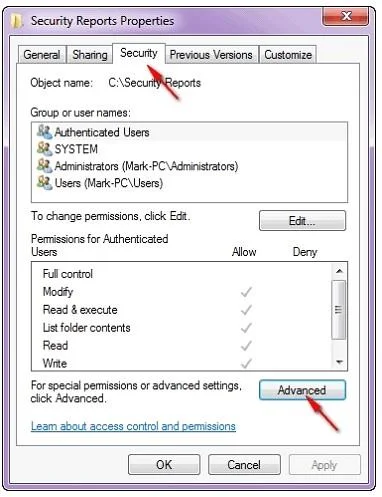
The correct answer is A. In the file properties > click the Advanced button on the Security tab. According to the question, you are required to check the effective permission of Rick on a file that is stored on a network location. For this, you will have to take the following steps: In the file properties > click the Advanced button on the Security tab. View Effective…
Question
Exhibit
Options
- AIn the file properties > click the Advanced button on the Security tab.
- BFrom the command prompt, run the Winrm utility.
- CIn the file properties, view the Security tab.
- DFrom the command prompt, run the WinRS utility.
How the community answered
(16 responses)- A81% (13)
- B6% (1)
- D13% (2)
Explanation
According to the question, you are required to check the effective permission of Rick on a file that is stored on a network location. For this, you will have to take the following steps: In the file properties > click the Advanced button on the Security tab. View Effective Permissions tab. When a user is a member of multiple groups and those groups are all assigned different permission to the same folder or file, it is difficult to determine the user's effective permission. Use the Effective Permission tool to calculate a user or group's effective permission by taking above mentioned steps. Answer: C is incorrect. The Security tab will show the NTFS permission of the file. It will not evaluate group permissions. Answer: D and B are incorrect. These utilities are used for remote management.
Topics
Community Discussion
No community discussion yet for this question.