
77-885 · Question #54
Our work as a Database Designer for Tech Perfect Inc. The company has a Windows Vista-based computer with Microsoft Office 2010 installed on it. The omputer has a database named Details. The…
The correct answer is C. Select the table > Press the Delete key. D. Right-click the table > Choose the Delete option from the shortcut menu. n order to delete the table, you should take one of the following steps: 1.Select the table > Press the Delete key. 2.Right-click the table > Choose the Delete option from the shortcut menu. Answer: B is incorrect. You can take this step while renaming the table. Answer: A is…
Question
Exhibit
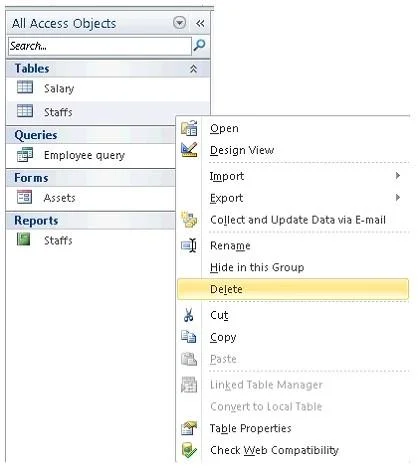
Options
- AClick the Database Tools tab > Select the Delete option.
- BClick on the table > Press F2.
- CSelect the table > Press the Delete key.
- DRight-click the table > Choose the Delete option from the shortcut menu.
How the community answered
(20 responses)- A5% (1)
- B15% (3)
- C80% (16)
Explanation
n order to delete the table, you should take one of the following steps: 1.Select the table > Press the Delete key. 2.Right-click the table > Choose the Delete option from the shortcut menu. Answer: B is incorrect. You can take this step while renaming the table. Answer: A is incorrect. There is no Delete option available in Database Tools.
Topics
Community Discussion
No community discussion yet for this question.