
77-427 · Question #15
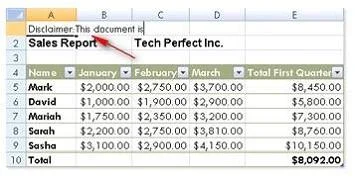
Rick works as a Sales Manager for Tech Perfect Inc. He is creating a report in Excel 2013. He has entered data in five worksheets in a workbook. He wants to enter a disclaimer message in the A1 cell…
The correct answer is D. Select all the five sheets. In order to accomplish the task, Rick should take the following steps: Select all the five sheets. Write a disclaimer message in the A1 cell of the active sheet. Grouping of sheets is a feature provided in Microsoft Office Excel 2013. Selecting more than one sheet groups those…
Question
Exhibit
Options
- AWrite a disclaimer message in the A1 cell of the first sheet.
- BWrite a disclaimer message in the A1 cell of the first sheet.
- CSelect all the five sheets. Click the first sheet.
- DSelect all the five sheets.
How the community answered
(29 responses)- A7% (2)
- B3% (1)
- C3% (1)
- D86% (25)
Explanation
In order to accomplish the task, Rick should take the following steps: Select all the five sheets. Write a disclaimer message in the A1 cell of the active sheet. Grouping of sheets is a feature provided in Microsoft Office Excel 2013. Selecting more than one sheet groups those sheets. When multiple sheets are grouped, data that a user enters or edits in the active sheet is reflected in all sheets in the group. To select all sheets, right-click a sheet tab, and then click Select All Sheets on the shortcut menu. C:\Documents and Settings\Administrator\Desktop\1.JPG Users can select multiple sheets by holding the Ctrl key while clicking the sheets. Answer option C is incorrect. Clicking the first sheet after selecting all sheets will ungroup the sheets and the message will only get inserted in the first sheet. Answer options B and A are incorrect. Both these options will work, but Rick will have to work more than required. Grouping sheets is a better option to work simultaneously on multiple sheets. Users can select multiple sheets by holding the Ctrl key while clicking the sheets. Answer option C is incorrect. Clicking the first sheet after selecting all sheets will ungroup the sheets and the message will only get inserted in the first sheet. Answer options B and A are incorrect. Both these options will work, but Rick will have to work more than required. Grouping sheets is a better option to work simultaneously on multiple sheets.
Topics
Community Discussion
No community discussion yet for this question.