
74-697 · Question #99
You have a server named Server1 that runs Windows Server 2012 and has the Windows Deployment Services server role installed. You recently removed a third-party DHCP server from the network, and then…
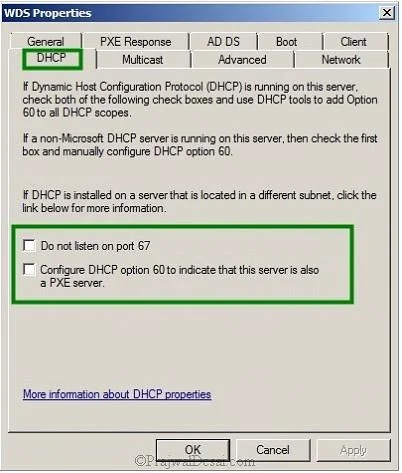
The correct answer is C. From the Windows Deployment Services console, click the DHCP tab, and then select the Do E. From the Windows Deployment Services console, click the DHCP tab, and then select the. If DHCP and WDS roles are installed on same server-In this case you must tell WDS not to listen on port 67 and set DHCP option 60 so that clients can find the WDS server. So options Do not listen on port 67 (C) and Configure DHCP option 60 to indicate that this server is also a…
Question
You have a server named Server1 that runs Windows Server 2012 and has the Windows Deployment Services server role installed. You recently removed a third-party DHCP server from the network, and then installed the DHCP Server server role on Server1. You create a scope on Server1. You discover that client computers attempting to receive a Windows 8 image fail to connect to Server1. You verify that the client computers on the network can receive an IP address from Server1. You need to ensure that the computers attempting to receive an image can connect to Server1. Which two actions should you perform? (Each correct answer presents part of the solution. Choose two.)
Exhibit
Options
- AFrom the DHCP console, click Server Options, and then set the value of Option 66 to Server1.
- BFrom the Windows Deployment Services console, click the PXE Response tab, and then set
- CFrom the Windows Deployment Services console, click the DHCP tab, and then select the Do
- DFrom the DHCP console, click Server Options, and then set the value of Option 67 to
- EFrom the Windows Deployment Services console, click the DHCP tab, and then select the
How the community answered
(41 responses)- A17% (7)
- B7% (3)
- C71% (29)
- D5% (2)
Explanation
If DHCP and WDS roles are installed on same server-In this case you must tell WDS not to listen on port 67 and set DHCP option 60 so that clients can find the WDS server. So options Do not listen on port 67 (C) and Configure DHCP option 60 to indicate that this server is also a PXE server (E) must be checked.
Topics
Community Discussion
No community discussion yet for this question.