
74-409 · Question #21
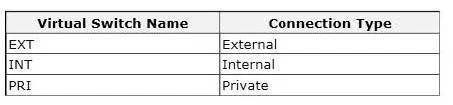
You have a Windows Server 2012 R2 with the Hyper-V role installed. The host server hosts a virtual machine (VM) named NYC-VM. The virtual switches for the host server are configured as follows…
The correct answer is B. Run the Windows PowerShell command Connect-VMNetworkAdapter-VMName NYC-. How to Configure Network Settings on a Hyper-V Host in VMM External - Use this type when you want to allow virtual machines to communicate with each other and with externally located servers, and optionally with the host operating system. The External type is bound to a…
Question
Exhibit
Options
- AOn NYC-VM, enable virtual LAN identification.
- BRun the Windows PowerShell command Connect-VMNetworkAdapter-VMName NYC-
- CConnect NYC-VM to the EXT switch.
- DRun the Windows PowerShell command Connect-VMNetworkAdapter-VMName NYC-
How the community answered
(27 responses)- A4% (1)
- B70% (19)
- C19% (5)
- D7% (2)
Explanation
How to Configure Network Settings on a Hyper-V Host in VMM External - Use this type when you want to allow virtual machines to communicate with each other and with externally located servers, and optionally with the host operating system. The External type is bound to a physical network adapter. This type can be used to allow virtual machines to access a perimeter network and not expose the host operating system. Internal - Use this type when you want to allow communication between virtual machines on the same host and between the virtual machines and the host. The Internal type is not bound to a physical network adapter. It is typically used to build a test environment where you want to connect to the virtual machines from the host operating system, but do not want to allow virtual machines on the host to communicate with external networks. Private - Use this type when you want to allow communication between virtual machines on the same host but not with the host or with external networks. The Private type does not have a virtual network adapter in the host operating system, nor is it bound to a physical network adapter. The Private type is typically used when you want to isolate virtual machines from network traffic in the host operating system and in the external networks.
Topics
Community Discussion
No community discussion yet for this question.