
74-338 · Question #6
You administer a Microsoft Lync Server 2010 Standard Edition server in your network environment. You deploy a Microsoft Lync Server 2013 Standard Edition server. You want to migrate users from Lync…
The correct answer is B. Right-click the error message and select Go to nearest entry in trace viewer. See the full explanation below for the reasoning.
Question
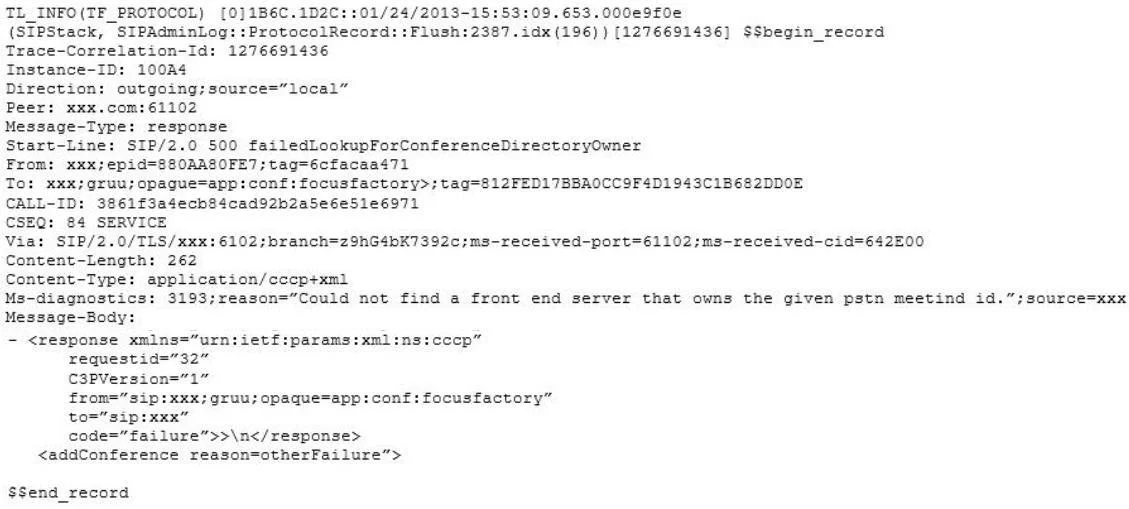
You administer a Microsoft Lync Server 2010 Standard Edition server in your network environment. You deploy a Microsoft Lync Server 2013 Standard Edition server. You want to migrate users from Lync Server 2010 to Lync Server 2013. You migrate a test account from Lync Server 2010 to Lync Server 2013. You start the Lync 2013 client on one of your test computers and start testing various modalities. During testing, you decide to test the Meet Now functionality in Lync 2013 client. Meet Now starts a conference and fails to connect. You start Clslogging.exe. You generate a log that includes the following information:
You need to identify the cause of the issue. What should you do first?
Exhibit
Options
- AOpen another log file from the Lync client in Snooper.
- BRight-click the error message and select Go to nearest entry in trace viewer.
- CStart WireShark and perform the Meet Now test again.
- DClick Show Call Flow Window.
How the community answered
(37 responses)- A14% (5)
- B73% (27)
- C5% (2)
- D8% (3)
Community Discussion
No community discussion yet for this question.