
Avaya
7230X · Question #65
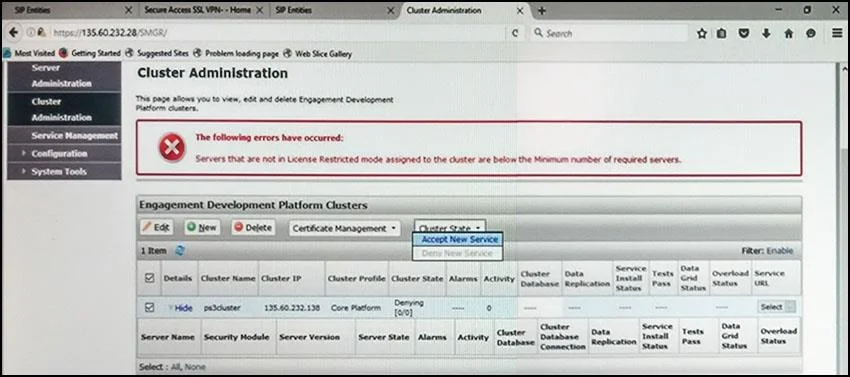
Refer to the exhibit. In the Cluster Administration screen of a PresenceServices cluster, when you try to change the cluster state to Accept New Service, you receive the error: Servers that are not…
Sign in or unlock 7230X to reveal the answer and full explanation for question #65. The question stem and answer options stay visible for context.
Question
Refer to the exhibit. In the Cluster Administration screen of a PresenceServices cluster, when you try to change the cluster state to Accept New Service, you receive the error: Servers that are not in License Restricted mode assigned to the cluster are below the Minimum number of required servers. You check that a server has been administered under Engagement Development Platform > Server Administration which shows green check under License Mode, and a System State of Denying. Which action needs to be taken to solve this problem?
Exhibit
Options
- AEdit the Cluster, access the Servers tab, and assign the server to the cluster; then set the cluster
- BUnder Engagement Development Platform > Server Administration, select the server and change
- CObtain and install an Avaya BreezeTM license on webLM with more instances of Avaya
- DEdit the cluster to change the cluster profile from Core Platform to General Purpose.
Unlock 7230X to see the answer
You've previewed enough free 7230X questions. Unlock 7230X for full answers, explanations, the timed quiz mode, progress tracking, and the master PDF. Question stem and options stay visible so you can still see what's on the exam.