
Avaya
7130X · Question #28
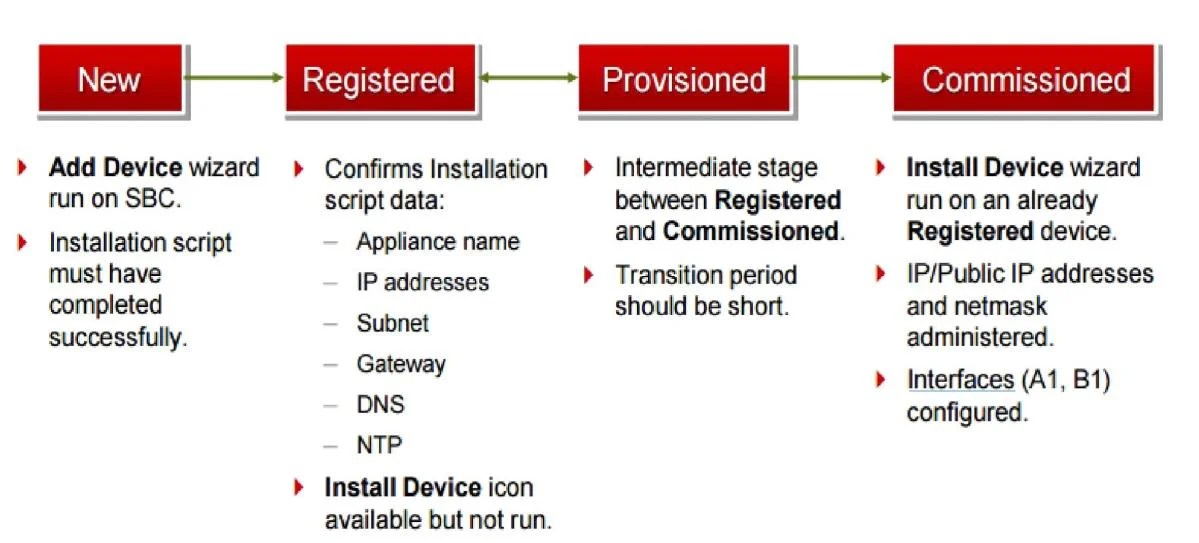
After the initial provisioning script has been run you see your Avaya Session Border Controller for Enterprise (SBCE) displaying a Registered state in the Web GUI. You click on the install link in…
The correct answer is A. Commissioned. See the full explanation below for the reasoning.
Question
After the initial provisioning script has been run you see your Avaya Session Border Controller for Enterprise (SBCE) displaying a Registered state in the Web GUI. You click on the install link in the EMS System Management > Devices menu to continue the installation. After displaying a status of Provisioning for a short while, which status does the SBCE display?
Exhibit
Options
- ACommissioned
- BUp
- CBusyout
- DMaintenance-Busy
How the community answered
(44 responses)- A77% (34)
- B2% (1)
- C14% (6)
- D7% (3)
Community Discussion
No community discussion yet for this question.