
Avaya
7120X · Question #37
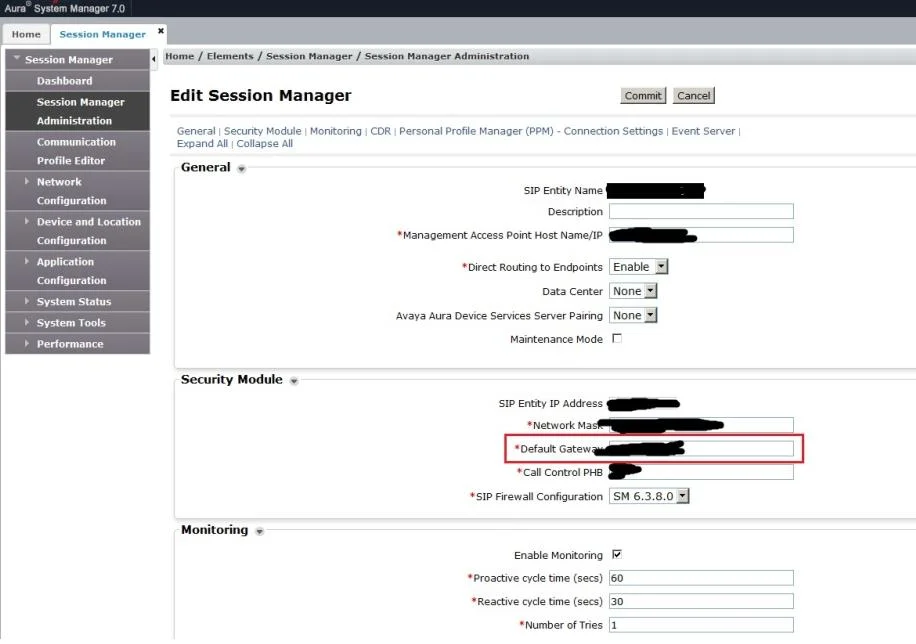
Ping attempts are failing to the SM100 IP address of a newly deployed SM, and you discover the problem is due to an incorrectly configured SM100 default gateway router address Which action would you…
The correct answer is B. Use Avaya Aura® System Manager (SMGR) web GUI to edit the SM Instance under SM. Elements -> Session Manager -> Session Manager Administration -> Session Manager Instances
Information Security Core Competencies
Question
Ping attempts are failing to the SM100 IP address of a newly deployed SM, and you discover the problem is due to an incorrectly configured SM100 default gateway router address Which action would you take to correct this configuration?
Exhibit
Options
- AExecute runs mconsole.
- BUse Avaya Aura® System Manager (SMGR) web GUI to edit the SM Instance under SM
- CExecute SMnetSetup
- DUse Avaya Aura® System Manager (SMGR) web GUI to edit the SIP Entity screen under
How the community answered
(37 responses)- A3% (1)
- B78% (29)
- C5% (2)
- D14% (5)
Explanation
Elements -> Session Manager -> Session Manager Administration -> Session Manager Instances
Topics
#network configuration#default gateway#troubleshooting#session manager
Community Discussion
No community discussion yet for this question.