
700-281 · Question #54
Drag and Drop Question Match the log file with its role in troubleshooting. Answer:
The correct answer is accesslog; updater_log; proxylog; trafmonlogs. Log Files & Troubleshooting Roles > Note: The question as provided is missing the role descriptions for positions 1–4. I'll explain based on each log's standard function, which aligns with the correct arrangement. --- The Arrangement Explained 1. accesslog - User Access &…
Question
Drag and Drop Question Match the log file with its role in troubleshooting. Answer:
Exhibit
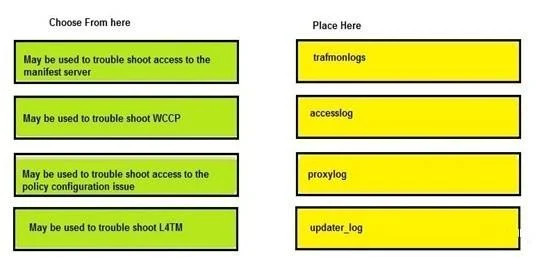
Answer Area
Drag items
Correct arrangement
- accesslog
- updater_log
- proxylog
- trafmonlogs
Explanation
Log Files & Troubleshooting Roles
Note: The question as provided is missing the role descriptions for positions 1–4. I'll explain based on each log's standard function, which aligns with the correct arrangement.
The Arrangement Explained
1. accesslog - User Access & Request Troubleshooting
The access log records end-user HTTP/HTTPS requests, blocked/allowed decisions, URLs visited, usernames, and response codes. It's the first stop for troubleshooting issues like:
- "Why is a site being blocked?"
- "Did this user access that resource?"
Common mistake: Confusing it with proxylog - accesslog is about what users requested, not how the proxy handled the connection internally.
2. updater_log - Software/Signature Update Troubleshooting
Captures activity from the update/download service - success/failure of policy, database, or signature updates. Used when:
- Threat definitions aren't updating
- Version mismatches occur
Common mistake: Overlooking this log when content filtering seems "stale" - outdated signatures are often the culprit.
3. proxylog - Proxy Service & Connectivity Troubleshooting
Records internal proxy engine events: connection handling, SSL inspection errors, upstream proxy communication, and service-level errors. Used when:
- The proxy itself is failing or rejecting connections
- SSL decryption errors occur
Common mistake: Using accesslog for these issues - proxy-level failures often don't generate clean access log entries.
4. trafmonlogs - Traffic Monitoring & Network-Level Troubleshooting
Captures raw network traffic data seen by the monitoring component. Used for:
- Detecting traffic bypassing the proxy
- Network flow analysis
- Identifying unrecognized protocols
Common mistake: Expecting this to show user-level details - it operates at the network/packet level, not the application/user level.
Quick Reference
| Position | Log | Primary Use |
|---|---|---|
| 1 | accesslog | User requests & policy enforcement |
| 2 | updater_log | Update/definition failures |
| 3 | proxylog | Proxy service errors |
| 4 | trafmonlogs | Network traffic visibility |
Topics
Community Discussion
No community discussion yet for this question.