
700-280 · Question #57
Refer to the exhibit. Based on the Add Condition menu which of listed file attachments will be matched? (Choose two.)
The correct answer is B. A .pdf attachment that has had its file extension changed to .exe. D. A .exe attachment. Options B and D are correct because the condition shown filters based on file extension, not true file type. A .pdf renamed to .exe (B) is matched because the filter sees the .exe extension, and a genuine .exe (D) is matched for the same reason - both present an .exe extension…
Question
Refer to the exhibit. Based on the Add Condition menu which of listed file attachments will be matched? (Choose two.)
Exhibit
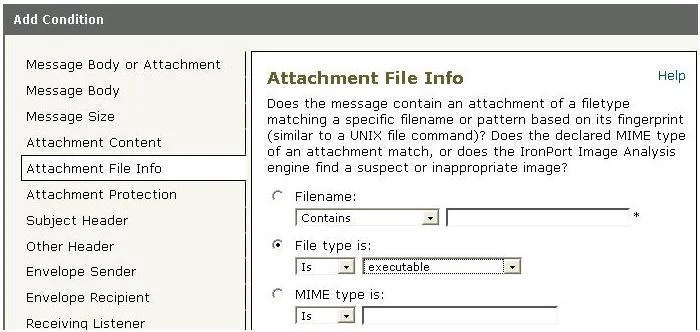
Options
- AA .msi attachment that has had its file extension changed to .pdf
- BA .pdf attachment that has had its file extension changed to .exe.
- CA.pdf attachment
- DA .exe attachment.
How the community answered
(36 responses)- A11% (4)
- B72% (26)
- C17% (6)
Explanation
Options B and D are correct because the condition shown filters based on file extension, not true file type. A .pdf renamed to .exe (B) is matched because the filter sees the .exe extension, and a genuine .exe (D) is matched for the same reason - both present an .exe extension to the filter.
Why the distractors fail:
- A is wrong: the
.msifile's extension was changed to.pdf, so the filter sees.pdfand does not trigger - the dangerous payload slips through. - C is wrong: a normal
.pdfdoesn't carry the.exeextension the condition is looking for, so it is not matched.
Memory tip: Think of this filter as a bouncer checking IDs by name only, not by face. Changing the name on the ID (renaming the extension) is what determines entry - the actual content inside the file is irrelevant to this particular condition. If you rename .pdf → .exe, you get caught; if you rename .exe → .pdf, you walk right in.
Topics
Community Discussion
No community discussion yet for this question.