
70-779 · Question #8
Note: This question is part of a series of questions that use the same scenario. For your convenience, the scenario is repeated in each question. Each question presents a different goal and answer…
Sign in or unlock 70-779 to reveal the answer and full explanation for question #8. The question stem and answer options stay visible for context.
Question
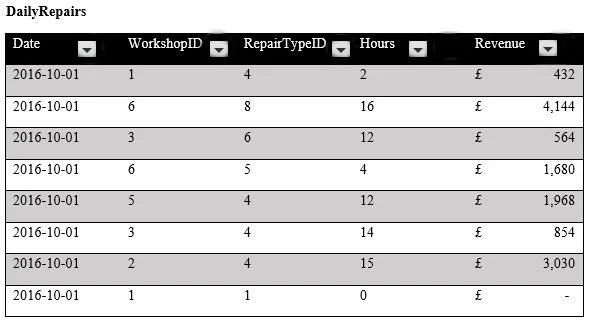
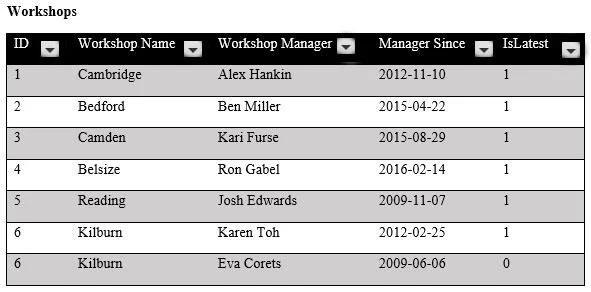
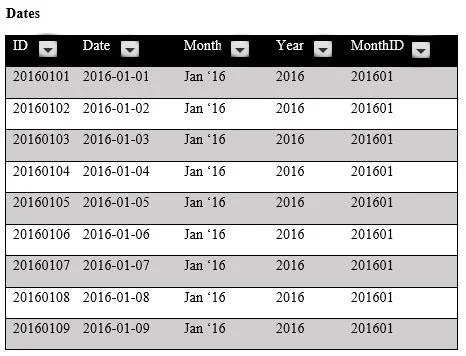
Note: This question is part of a series of questions that use the same scenario. For your convenience, the scenario is repeated in each question. Each question presents a different goal and answer choices, but the text of the scenario is the same in each question in this series. Start of repeated scenario. You are creating reports for a car repair company. You have four datasets in Excel spreadsheets. Four workbook queries load the datasets to a data model. A sample of the data is shown in the Data Sample exhibit. (Click the Exhibit button.) Data Sample exhibit:
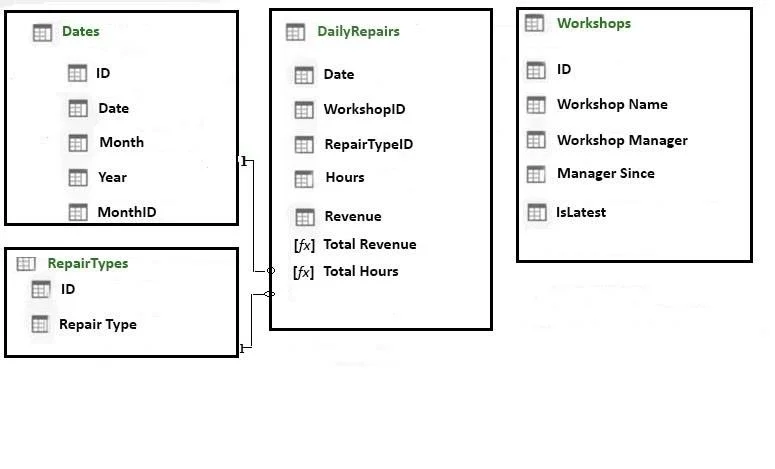
The data model is shown in the Data Model exhibit. (Click the Exhibit button.) The tables in the model contain the following data:
DailyRepairs has a log of hours and revenue for each day, workshop, and repair type. Every day, a log entry is created for each workshop, even if no hours or revenue are recorded for that day. Total Hours and Total Revenue column. Workshops have a list of all the workshops and the current and previous workshop managers. The format of the Workshop Manager column is always Firstname Lastname. A value of 1 in the IsLatest column indicates that the workshop manager listed in the record is the current workshop manager. RepairTypes has a list of all the repair types Dates has a list of dates from 2015 to 2018 End of repeated scenario. You create a measure named Average Revenue Per Hour that calculates the average revenue per hour. You need to populate a cell in a worksheet to display the Average Revenue Per Hour where Repair Type is Engine. Which Excel formula should you use?
Exhibits
Options
- A=CUBEMEMBER("ThisWorkbookDataModel", "[DailyRepairs]. [Avg Revenue Per Hour]",
- B=CUBEVALUE("ThisWorkbookDataModel", "[Measures]. [Avg Revenue Per Hour]",
- C=CUBEMEMBER("ThisWorkbookDataModel", "[DailyRepairs]. [Avg Revenue Per Hour]",
- D=CUBEVALUE("ThisWorkbookDataModel", "[Measures]. [Avg Revenue Per Hour]",
Unlock 70-779 to see the answer
You've previewed enough free 70-779 questions. Unlock 70-779 for full answers, explanations, the timed quiz mode, progress tracking, and the master PDF. Question stem and options stay visible so you can still see what's on the exam.