
70-779 · Question #62
Note: This question is part of a series of questions that use the same scenario. For your convenience, the scenario is repeated in each question. Each question presents a different goal and answer…
Sign in or unlock 70-779 to reveal the answer and full explanation for question #62. The question stem and answer options stay visible for context.
Question
Note: This question is part of a series of questions that use the same scenario. For your convenience, the scenario is repeated in each question. Each question presents a different goal and answer choices, but the text of the scenario is the same in each question in this series. Start of repeated scenario. You are creating reports for a car repair company. You have four datasets in Excel spreadsheets. Four workbook queries load the datasets to a data model. A sample of the data is shown in the Data Sample exhibit. (Click the Exhibit button.) Data Sample exhibit:
The data model is shown in the Data Model exhibit. (Click the Exhibit button.) The tables in the model contain the following data:
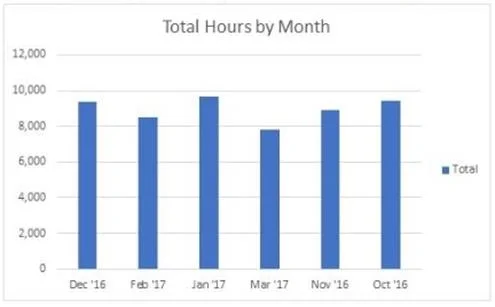
DailyRepairs has a log of hours and revenue for each day, workshop, and repair type. Every day, a log entry is created for each workshop, even if no hours or revenue are recorded for that day. Total Hours and Total Revenue column. Workshops have a list of all the workshops and the current and previous workshop managers. The format of the Workshop Manager column is always Firstname Lastname. A value of 1 in the IsLatest column indicates that the workshop manager listed in the record is the current workshop manager. RepairTypes has a list of all the repair types Dates has a list of dates from 2015 to 2018 End of repeated scenario. You create the column chart shown in the Pivot Chart exhibit. You need to ensure that the month axis is displayed chronologically. What should you do?
Exhibit
Options
- AIn the model, configure the Sort By Column setting for [Month] as [MonthID].
- BIn the model, configure the Sort By Column setting for (Month) as [Date].
- CIn PivotTable Fields, add [MonthID] to the Legend area.
- DIn PivotTable Fields, add [Date] to the Legend area.
Unlock 70-779 to see the answer
You've previewed enough free 70-779 questions. Unlock 70-779 for full answers, explanations, the timed quiz mode, progress tracking, and the master PDF. Question stem and options stay visible so you can still see what's on the exam.