
Microsoft
70-778 · Question #67
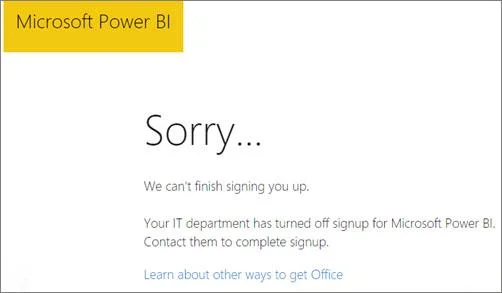
Your organization has a Microsoft Office 365 subscription. When the users attempt to access the Power BI Service, they receive the error message shown in the exhibit. You need to ensure that all the…
The correct answer is D. From Microsoft Azure PowerShell, run the Set-MsolCompanySettings cmdlet. https://docs.microsoft.com/en-us/power-bi/service-admin-service-free-in-your- organization#enable-or-disable-individual-user-sign-up-in-azure-active-directory
Configure Dashboards, Reports, and Apps in the Power BI Service
Question
Your organization has a Microsoft Office 365 subscription. When the users attempt to access the Power BI Service, they receive the error message shown in the exhibit. You need to ensure that all the users can access the Power BI service. What should you do first?
Exhibit
Options
- AFrom the properties of each dashboard, modify the Share dashboard settings.
- BFrom Microsoft Azure PowerShell, run the Set-MsolDomain cmdlet.
- CInstruct each user to install Microsoft Office 2016.
- DFrom Microsoft Azure PowerShell, run the Set-MsolCompanySettings cmdlet.
How the community answered
(42 responses)- A5% (2)
- B7% (3)
- C12% (5)
- D76% (32)
Explanation
https://docs.microsoft.com/en-us/power-bi/service-admin-service-free-in-your- organization#enable-or-disable-individual-user-sign-up-in-azure-active-directory
Topics
#Power BI Service access#tenant settings#MsolCompanySettings#Office 365 admin
Community Discussion
No community discussion yet for this question.