
Microsoft
70-778 · Question #12
Note: This question is a part of a series of questions that present the same scenario. For your convenience, the scenario is repeated in each question. Each question presents a different goal and…
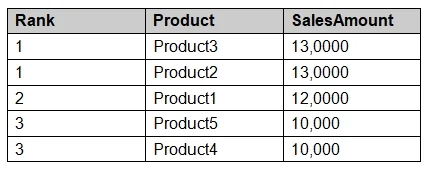
The correct answer is B. Product Ranking= RANKX (ALL, (`Product'), [SalesAmount], , DESC, Dense). https://msdn.microsoft.com/en-us/library/gg492185.aspx
Manage big data solutions
Question
Note: This question is a part of a series of questions that present the same scenario. For your convenience, the scenario is repeated in each question. Each question presents a different goal and answer choices, but the text of the scenario is exactly the same in each question in this series. Start of repeated scenario You have a Microsoft SQL Server database that has the tables shown in the Database Diagram exhibit. (Click the Exhibit.) You plan to develop a Power BI model as shown in the Power BI Model exhibit. (Click the Exhibit). You plan to use Power BI to import data from 2013 to 2015. Product Subcategory [Subcategory] contains NULL values. End of repeated scenario. You implement the Power BI model. You need to add a measure to rank total sales by product. The results must appear as shown in the following table. Which DAX formula should you use?
Exhibit
Options
- AProduct Ranking= RANKX (Product, [SalesAmount], , DESC, Skip)
- BProduct Ranking= RANKX (ALL, (`Product'), [SalesAmount], , DESC, Dense)
- CProduct Ranking= RANKX (ALL, (`Product'), [SalesAmount], , DESC, Skip)
- DProduct Ranking= RANKX (ALL (`Product'), [SalesAmount], , Asc, Dense
How the community answered
(33 responses)- A6% (2)
- B82% (27)
- C9% (3)
- D3% (1)
Explanation
Topics
#Power BI#DAX#RANKX function#calculated measures
Community Discussion
No community discussion yet for this question.