
Microsoft
70-735 · Question #33
You have an image of Windows 10 that runs the Windows 10 Anniversary Update. You plan to deploy the image to several new computers. You add Microsoft Office 2016 to the image. You need to ensure…
Sign in or unlock 70-735 to reveal the answer and full explanation for question #33. The question stem and answer options stay visible for context.
Configure and customize Windows 10 images
Question
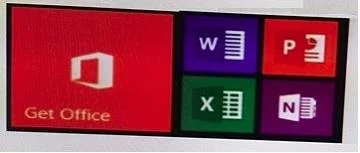
You have an image of Windows 10 that runs the Windows 10 Anniversary Update. You plan to deploy the image to several new computers. You add Microsoft Office 2016 to the image. You need to ensure that when the image is deployed, users will see the Office 2016 tiles on the Start menu as shown in the exhibit. What should you do?
Exhibit
Options
- ACreate a LayoutModification.xml file and save the file in the
- BModify the DefaultLayouts.xml file and save the file in the
- CModify the DefaultLayouts.xml file and save the file in the
- DCreate a LayoutModification.xml file and save the file in the
Unlock 70-735 to see the answer
You've previewed enough free 70-735 questions. Unlock 70-735 for full answers, explanations, the timed quiz mode, progress tracking, and the master PDF. Question stem and options stay visible so you can still see what's on the exam.
Topics
#Start menu#LayoutModification.xml#Office tiles#Start layout