
70-698 · Question #63
Note: This question is part of a series of questions that use the same scenario. For your convenience, the scenario is repeated in each question. Each question presents a different goal and answer…
The correct answer is C. Remote Assistance. Remote Assistance allows a support technician to view and control a user's desktop with their consent, making it the appropriate tool for interactive remote help sessions.
Question
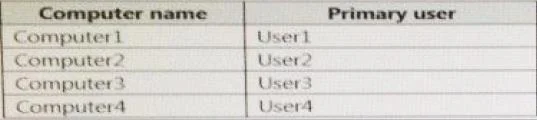
Note: This question is part of a series of questions that use the same scenario. For your convenience, the scenario is repeated in each question. Each question presents a different goal and answer choices, but the text of the scenario is exactly the same in each question in this series. Start of repeated scenario Your network contains a single Active Directory domain named adatum.com. The network contains five servers configured as shown in the following table. All of the servers run Windows Server 2012 R2. Test_Server has a shared folder named ShareA. Only local users have permissions to ShareA. The network contains a mainframe computer that is administered by using the Telnet protocol. The domain contains four client computers configured as shown in the following table. All of the client computers run the 64-bit version of Windows. User3 frequently accesses ShareA. Remote Desktop is enabled on Computer4. Your company identifies the following requirements:
- Ensure that you can test unsigned device drivers on Computer1
- Enable Credential Guard on Computer2.
- Run commands and cmdlets remotely on computer2.
- Configure User Account control (UAC) on Computer3 to prompt
administrators for credentials when elevated privileges are required.
- Ensure that User1 can view and interact with a desktop session of
User3.
- Ensure that User2 can use Telnet to manage the mainframe.
- Ensure that User4 can use Remote Desktop to access Computer4
remotely. End of repeated scenario. You need to recommend a solution to meet the requirements of User1. What should you include in the recommendation?
Exhibits

Options
- ARemote Access Connection Manager
- BRemote Desktop
- CRemote Assistance
- DWindows PowerShell Remoting
How the community answered
(27 responses)- A4% (1)
- B4% (1)
- C81% (22)
- D11% (3)
Why each option
Remote Assistance allows a support technician to view and control a user's desktop with their consent, making it the appropriate tool for interactive remote help sessions.
Remote Access Connection Manager is a service that manages VPN and dial-up connections, not a tool for providing interactive desktop support to a user.
Remote Desktop creates a new independent session on the remote computer and does not allow the helper to interact with the currently logged-in user's session.
Remote Assistance is designed for scenarios where a helper needs to connect to an end user's session to provide support while the user is present and can grant permission. It allows the helper to observe or take control of the desktop interactively, which is the appropriate tool for user-facing support scenarios in a domain environment.
Windows PowerShell Remoting provides command-line remote execution capabilities but does not offer a graphical desktop-sharing experience for user assistance.
Concept tested: Windows Remote Assistance for interactive user support
Source: https://learn.microsoft.com/en-us/windows-server/remote/remote-desktop-services/clients/remote-desktop-allow-access
Topics
Community Discussion
No community discussion yet for this question.