
70-698 · Question #43
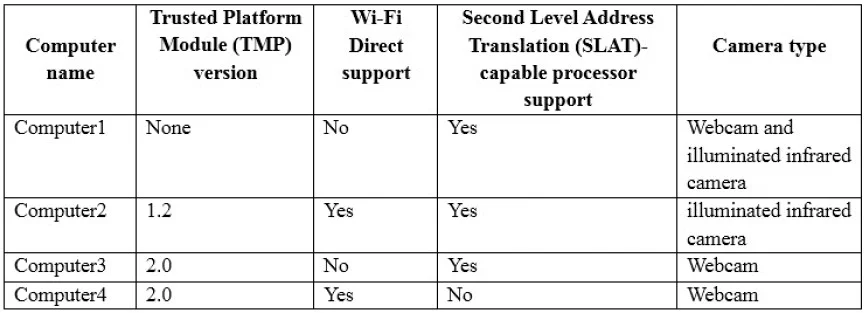
You have four computers configured as shown in the following table. You need to deploy Windows 10 Enterprise. The deployment must support Miracast, BitLocker Drive Encryption (BitLocker), and…
The correct answer is B. Computer2. The three deployment requirements each have specific hardware prerequisites. Miracast requires a Wi-Fi adapter that supports Wi-Fi Direct and a WDDM 1.3 or later graphics driver. BitLocker Drive Encryption requires a TPM (Trusted Platform Module) chip, version 1.2 minimum (2.0…
Question
You have four computers configured as shown in the following table. You need to deploy Windows 10 Enterprise. The deployment must support Miracast, BitLocker Drive Encryption (BitLocker), and Windows Hello with facial recognition. On which computer should you install Windows 10?
Exhibit
Options
- AComputer1
- BComputer2
- CComputer3
- DComputer4
How the community answered
(29 responses)- A10% (3)
- B62% (18)
- C7% (2)
- D21% (6)
Explanation
The three deployment requirements each have specific hardware prerequisites. Miracast requires a Wi-Fi adapter that supports Wi-Fi Direct and a WDDM 1.3 or later graphics driver. BitLocker Drive Encryption requires a TPM (Trusted Platform Module) chip, version 1.2 minimum (2.0 preferred). Windows Hello facial recognition requires a specialized infrared (IR) camera - a standard webcam is not sufficient, as IR depth sensing is needed to create a secure biometric map. Computer2 is the only computer in the table that satisfies all three requirements simultaneously: it has a compatible Wi-Fi adapter for Miracast, a TPM chip for BitLocker, and an IR camera for Windows Hello facial recognition. The other computers are missing at least one of these hardware components, making them unable to fully support the required feature set.
Topics
Community Discussion
No community discussion yet for this question.