
Microsoft
70-698 · Question #100
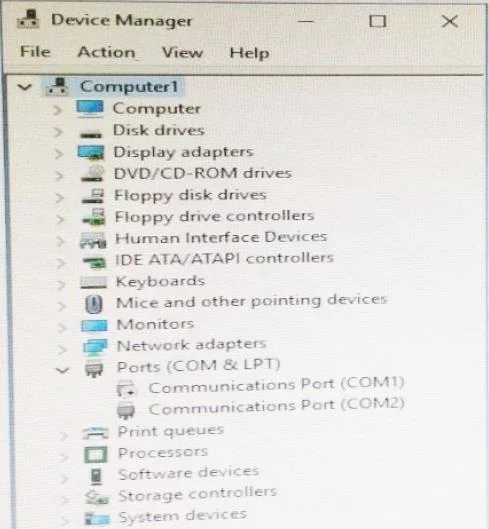
You have a computer named Computer1 that runs Windows 10. Device Manager on Computer1 is configured as shown in the exhibit. (Click the Exhibit button.) You need to ensure that you can use…
The correct answer is C. Enable Communications Port (COM1). https://support.microsoft.com/en-us/help/819036/overview-of-the-comdisable-tool
Configure devices and device drivers
Question
You have a computer named Computer1 that runs Windows 10. Device Manager on Computer1 is configured as shown in the exhibit. (Click the Exhibit button.) You need to ensure that you can use Communications Port (COM1). What should you do?
Exhibit
Options
- AUpdate the driver for Communications Port (COM1),
- BAttach a device to Communications Port (COM1), and then click Scan for hardware changes.
- CEnable Communications Port (COM1).
- DModify the IRQ and the I/O Range for Communications Port (COM1).
How the community answered
(14 responses)- B7% (1)
- C86% (12)
- D7% (1)
Explanation
https://support.microsoft.com/en-us/help/819036/overview-of-the-comdisable-tool
Topics
#Device Manager#COM port#disabled device#hardware enable
Community Discussion
No community discussion yet for this question.